# Configure Requirement Rules in a Patch My PC Cloud Deployment

*Applies to: Patch My PC Cloud*

{% hint style="danger" %}
**Important**

This documentation is for a pre-release feature still under development and, therefore, incomplete. As a result, both functionality and documentation are subject to change.

Once this feature is released, it will be announced, and this banner will be removed.
{% endhint %}

The **Requirements** tool of the Patch My PC (PMPC) Cloud deployment wizard allows you to configure custom optional requirements (including requirement rules) that must be met for the app to be deployed to the target audience.

This includes:

* [Standard Requirements](#standard-requirements)
* [OS Architecture Requirements](#os-architecture-requirements)
* [Additional Requirements Rules](#additional-requirements-rules)

<figure><img src="https://3773699522-files.gitbook.io/~/files/v0/b/gitbook-x-prod.appspot.com/o/spaces%2F-MX7dvS0r_4fc0AikgJS%2Fuploads%2FskWrkJxwXLLFIkcoEeeC%2Fimage.png?alt=media&#x26;token=cb55e299-b195-418d-be5f-ea4cfc509c72" alt="Requirements section" width="563"><figcaption></figcaption></figure>

Configure these settings as required and detailed below.

{% hint style="danger" %}
**Important**

If you are deploying a Custom App created with Requirement Rules, some of the fields in this section will be prefilled. Although you can modify the fields as required, you will be unable to specify a value that is lower than that configured in the properties of the Custom App.
{% endhint %}

## Standard Requirements

### Minimum operating system

From the **Minimum operating system** dropdown, select the minimum operating system required by this app.

{% hint style="info" %}
**Note**

The default **Minimum operating system** value is set to match the first value in the dropdown, which corresponds to the oldest version of Windows still supported by Microsoft. As Microsoft deprecates a Windows version, this value and the values in the dropdown list will automatically update to the oldest version still supported by Microsoft.
{% endhint %}

{% hint style="success" %}
**Tip**

We recommend leaving the **Minimum operating system** dropdown at its default unless you need to configure a specific value. If an app/deployment is configured for a specific Windows version, when Microsoft retires that version, you will no longer be able to deploy the app unless you update this field to a supported Windows version.
{% endhint %}

### Min RAM memory (MB)

Configure the minimum amount of RAM required to run this app.

### Minimum CPU speed (MHz)

Configure the minimum CPU speed required to run this app.

### Minimum number of logical processors

Configure the minimum number of logical processors required to run this app.

## OS Architecture Requirements

The *OS Architecture Requirements* section lets you specify which operating system (OS) architectures the app can be deployed to.

By default, the relevant checkbox is checked based on the value configured in the **Architecture** field.

{% hint style="info" %}
**Note**

For example, if **Architecture** is configured:

* As **64-bit**, the **32-bit** checkbox under **OS Architecture Requirements** will be unchecked and cannot be checked.
* As **32-bit**, the **32-bit** checkbox under **OS Architecture Requirements** will be checked and cannot be unchecked. As this is a 32-bit app, the **64-bit** checkbox is checked by default, but it can be checked.

You also cannot uncheck the checkbox in the **OS Architecture Requirements** section that corresponds to the selected **Architecture**.

The **ARM** checkbox in the **OS Architecture Requirements** section can always be checked/unchecked, regardless of the configured **Architecture**.
{% endhint %}

Configure the relevant settings as required.

## Additional Requirements Rules

Using the **Additional Requirements Rule** section, you can create up to 10 optional requirement rules based on the following:

* File
* Registry
* Script

To configure an Additional Requirement Rule:

1. Click **Add** in the **Additional Requirements Rules** section.

<figure><img src="https://3773699522-files.gitbook.io/~/files/v0/b/gitbook-x-prod.appspot.com/o/spaces%2F-MX7dvS0r_4fc0AikgJS%2Fuploads%2FvxLt7UBClP1ayzRDmSXo%2Fimage.png?alt=media&#x26;token=f05c0d1c-31fd-428a-a34f-1e75bee6e038" alt="Clicking ‘Add’ in the ‘Additional Requirements Rules’ section" width="563"><figcaption></figcaption></figure>

2. On the **Add Requirement Rule** screen, select the relevant type of rule from the **Rule Type** dropdown, then configure the required options as required.

<figure><img src="https://3773699522-files.gitbook.io/~/files/v0/b/gitbook-x-prod.appspot.com/o/spaces%2F-MX7dvS0r_4fc0AikgJS%2Fuploads%2FlsW2RGcweGSCrOYbwRWz%2Fimage.png?alt=media&#x26;token=52c5eb93-b813-4acf-82ce-22174a8d120d" alt="Selecting the required ‘Rule Type’" width="449"><figcaption></figcaption></figure>

{% hint style="info" %}
**Note**

To configure a script-based Requirement Rule requires the PowerShell script to already exist.
{% endhint %}

<table><thead><tr><th width="112.888916015625" valign="top">Rule Type</th><th valign="top">Available Options</th></tr></thead><tbody><tr><td valign="top">File</td><td valign="top"><ul><li><strong>Path –</strong> The path to the folder you are checking for.</li><li><strong>File or Folder –</strong> The folder containing the file you are checking for.</li><li><strong>Property –</strong> Various options, such as whether the item exists or does not, the date it was created, modified, etc.</li></ul></td></tr><tr><td valign="top">Registry</td><td valign="top"><ul><li><strong>Key Path –</strong> The path to the Registry key.</li><li><strong>Value name (optional) –</strong> The name of a value contained within the specified Key Path that you want to check for.</li><li><strong>Registry key requirement –</strong> Various options, such as whether the key exists or does not, comparisons, etc.</li></ul></td></tr><tr><td valign="top">Script</td><td valign="top"><ul><li><strong>Script Name –</strong> The name of the script, which you can leave blank if you want to use the name of the script you are going to import.</li><li><strong>Import Script –</strong> Allows you to browse to an existing PowerShell script to import.</li></ul><p><mark style="color:blue;"><strong>NOTE</strong></mark><br>If the script is unsigned, you will see the <strong>Script was detected as unsigned</strong> warning.</p><ul><li><strong>Script –</strong> Shows the script’s content.</li></ul><p><mark style="color:blue;"><strong>NOTE</strong></mark><br>You cannot modify the script in the <strong>Script</strong> window.</p><ul><li><strong>Select output data type -</strong> Various options, such as type, version, etc.</li></ul></td></tr></tbody></table>

3. Configure the following additional options based on the type of rule you are creating.

<table><thead><tr><th width="140.6666259765625" valign="top">Rule Type</th><th valign="top">Additional Options</th></tr></thead><tbody><tr><td valign="top">File or Registry</td><td valign="top"><ul><li><strong>Associated with a 32-bit app on 64-bit clients –</strong> If enabled, allows the rule to expand any path environment variables in the 32-bit context on 64-bit endpoints.</li></ul></td></tr><tr><td valign="top">Script</td><td valign="top"><ul><li><strong>Run script as 32-bit process on 64-bit clients –</strong> If enabled, allows the script to be run in a 32-bit process on 64-bit clients. If disabled, the script runs in a 64-bit process on 64-bit clients and in a 32-bit process on 32-bit clients.</li><li><strong>Run this script using the logged on credentials -</strong> Run the script using the credentials signed in to the device.</li><li><strong>Enforce signature check –</strong> If enabled, verifies that the script is signed by a trusted publisher, allowing the script to run without warnings or prompts. The script will run unblocked. If disabled, will require the end user to confirm they are happy for the script to run, but without signature verification.</li></ul><p><mark style="color:blue;"><strong>NOTE</strong></mark><br>If the script imported is unsigned, you will be unable to enable this option.</p></td></tr></tbody></table>

{% hint style="info" %}
**Note**

In terms of Scripts, in the current version:

* We only support PowerShell (.ps1) scripts
* You can only import a single script per Requirement Rule.
* We do not sign your scripts if we use them in one of our deployments. If this is a requirement, you will need to sign the scripts yourself.
  {% endhint %}

4. Click **Add Rule** to add the requirement rule.

<figure><img src="https://3773699522-files.gitbook.io/~/files/v0/b/gitbook-x-prod.appspot.com/o/spaces%2F-MX7dvS0r_4fc0AikgJS%2Fuploads%2FZfb9BoOth72gj773EeHa%2Fimage.png?alt=media&#x26;token=16c43b6a-9cd5-4176-ac73-aae4c105ded3" alt="Clicking ‘Add Rule’ to add the requirement rule" width="450"><figcaption></figcaption></figure>

The rule is added to the list of requirement rules.

<figure><img src="https://3773699522-files.gitbook.io/~/files/v0/b/gitbook-x-prod.appspot.com/o/spaces%2F-MX7dvS0r_4fc0AikgJS%2Fuploads%2F2rEG97ucDA5EyxfcTV1r%2Fimage.png?alt=media&#x26;token=39574749-d843-4e50-a1dc-1d23f3643ca2" alt="Rule added to the list of requirement rules" width="563"><figcaption></figcaption></figure>

{% hint style="info" %}
**Note**

You will notice that a default **Script** Requirement Rule is added to the deployment, which cannot be edited or deleted. This is only actually used if you add an **Update Only** assignment to this deployment. Previously, we automatically added this script in the background in this scenario. We now highlight this so you can see the contents of this script.

Also, you can:

* Edit a Requirements Rule by clicking the pencil icon beside the relevant rule, making the required changes, then clicking **Save Rule** to save the changes.
* Delete a Requirements Rule by clicking the red trash can beside the relevant rule to remove it from the list of rules.
  {% endhint %}

{% hint style="success" %}
**Tip**

You can click the eye icon beside the **Script** rule to open the **View Requirement Rule** screen, where you can see the content of the script.
{% endhint %}

5. Repeat the steps in this section to add any additional requirement rules.

{% hint style="info" %}
**Note**

[Editing a deployment](https://docs.patchmypc.com/patch-my-pc-cloud/deployments/manage-deployments/edit) and changing any Requirement Rules will apply any changes in Intune immediately after the deployment is updated successfully in Intune.
{% endhint %}

{% hint style="danger" %}
**Important**

Using **Add Version** will not update the original deployment with any changes made to the Requirement Rules. If you edit the original deployment, you will see errors highlighting where settings with higher values for the new version have been configured compared to those in the original deployment.

If you configure Requirement Rules in both the Cloud Portal and Intune, the rules in the Portal will overwrite those in Intune. Likewise, if you have configured requirements in Intune and not in the Cloud Portal, we will not copy these to the Portal and will copy these requirements forward.
{% endhint %}

## Next Steps

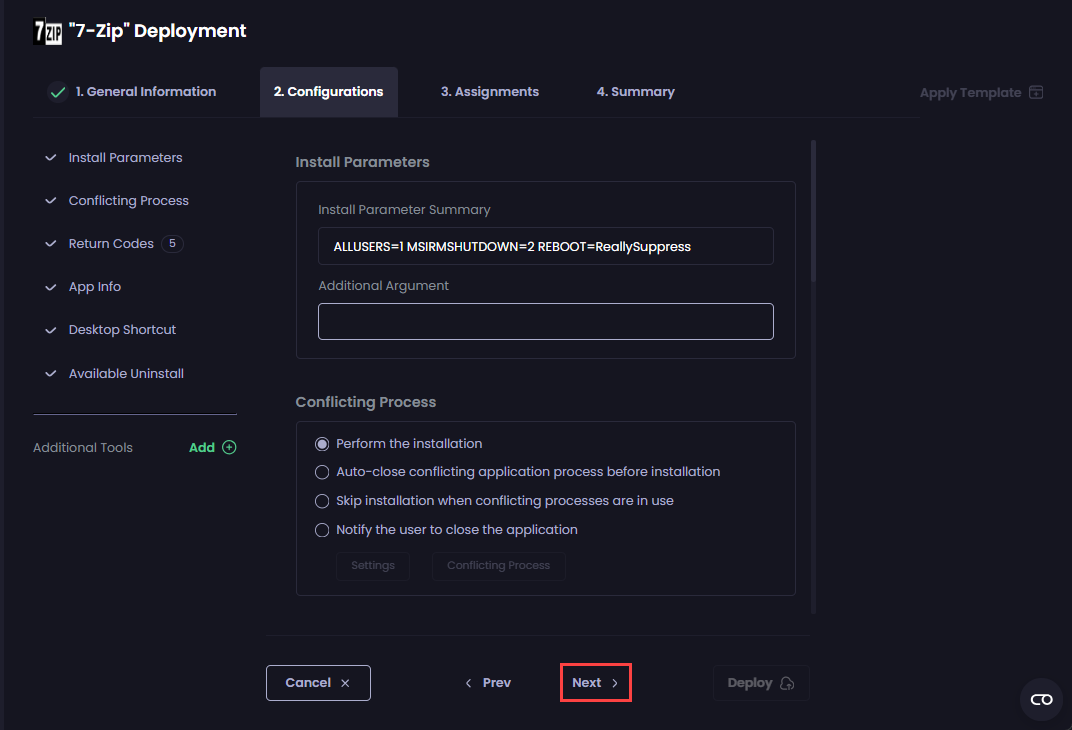
If you do not want to configure any additional settings, click **Next** to move to the [Assignments](https://docs.patchmypc.com/patch-my-pc-cloud/deployments/deploy-app/assignments-tab) tab.

Otherwise, navigate to the relevant tool to configure the required settings, which are explained in the relevant section.

<figure><img src="https://3773699522-files.gitbook.io/~/files/v0/b/gitbook-x-prod.appspot.com/o/spaces%2F-MX7dvS0r_4fc0AikgJS%2Fuploads%2F4d7ankFXZ6PyF2SmXh3P%2Fimage.png?alt=media&#x26;token=24157b0c-5967-463d-bf55-3c93e80c8345" alt="Clicking &#x27;Next&#x27;" width="563"><figcaption></figcaption></figure>