| Status | Means the application… |
|---|---|
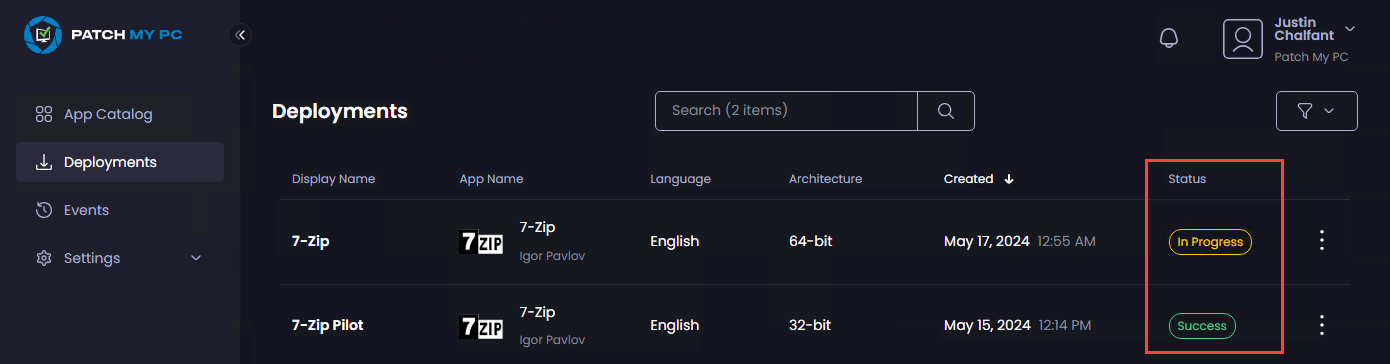
| Success | The application was successfully created in Intune. |
| In Progress | The application is currently being created in Intune. During periods of high activity, processing may take longer than usual. If an issue occurs, the Portal will automatically retry the creation process for up to 24 hours. During this time, the status will change to Retrying. If the application still cannot be created after 24 hours, the status will change to Failed. |
| Retrying | The application is still being processed. The initial creation attempt was unsuccessful and may have failed due to a Microsoft Graph issue or a temporary issue within Patch My PC services. No action is required from you as PMPC. Patch My PC will continue retrying the operation for up to 24 hours. If the deployment remains in a Retrying state for longer than 24 hours, the status will change to Failed. |
| Failed | The deployment could not be successfully processed and created in Intune. In some cases, the application may already exist in Intune even though the deployment is marked as Failed. This can happen when the app is successfully created, but PMPC is unable to complete all required processing steps or confirm the final status. If a deployment remains unsuccessful after all retry attempts, its status will be changed to Failed. Please Open a Support Case for assistance. |