> For the complete documentation index, see [llms.txt](https://docs.patchmypc.com/llms.txt). Markdown versions of documentation pages are available by appending `.md` to page URLs; this page is available as [Markdown](https://docs.patchmypc.com/patch-my-pc-publisher/requirements/configmgr-requirements/permissions.md).
# ConfigMgr Permission Requirements for Patch My PC Publisher
*Applies to: Patch My PC Publisher V3.x*
Patch My PC (PMPC) Publisher has permission requirements for both:
* [Microsoft Configuration Manager (ConfigMgr)](#microsoft-configuration-manager-configmgr-permission-requirements)
* [Microsoft SQL](#microsoft-sql-permission-requirements)
## Microsoft Configuration Manager (ConfigMgr) Permission Requirements
Publisher has the following Microsoft ConfigMgr permission requirements:
* [Security Role](#configmgr-security-role)
* [Content Source Folder](#content-source-folder)
### ConfigMgr Security Role
Publisher can create, manage, update, and delete applications in ConfigMgr as well as perform other functions like triggering a Software Update Point (SUP) sync.
In order to be able to perform these functions, Publisher requires the following permissions in ConfigMgr:
* **Application:** Read, Modify, Delete, Set Security Scope, Create, Move Object, Modify Folder
* **Distribution Point:** Read, Copy to Distribution Point
* **Distribution Point Group:** Read, Copy to Distribution Point Group
* **Folder Class:** Read, Modify, Create
* **Security Scopes:** Read
* **Site:** Read
* **Software Updates:** Read, Modify
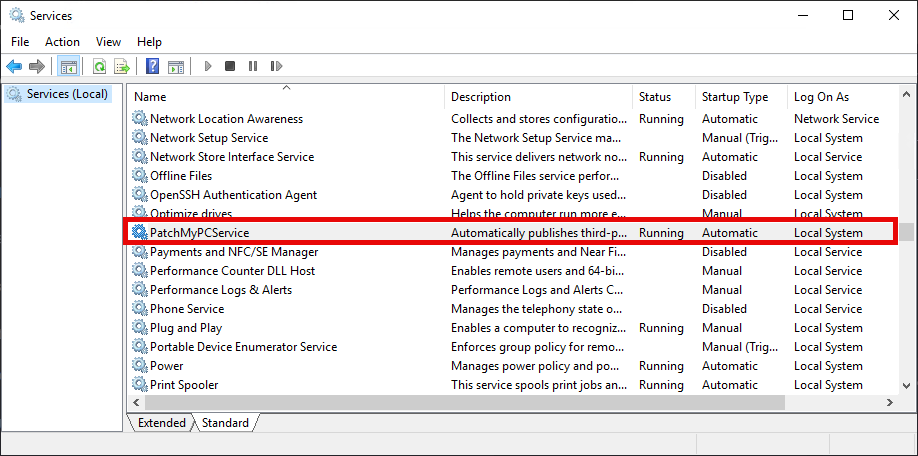
The **PatchMyPCService** service runs in the **SYSTEM** context by default.
If Publisher is installed on the ConfigMgr Site Server, no further action is required as the **SYSTEM** account has the required access.
However, if Publisher is installed on a remote server, the **Computer$** account of that server will require the permissions detailed above.
{% hint style="info" %}
**Note**
During a scheduled sync, these operations are performed under the context of the logon account specified for the **PatchMyPCService**. By default, this will be **SYSTEM**. Tasks performed manually in Publisher are performed under the context of the currently logged-on user.
{% endhint %}
More details can be found in the following KB, including how to create a custom Security Role to grant these permissions.
{% embed url="" %}
### Content Source Folder
To create, manage, and update third-party application content in ConfigMgr, Publisher needs at least the **Modify** permission on both the SMB share and NTFS folder you specify as the **Source Folder** during configuration.
Publisher accesses the application source UNC path using the **SYSTEM** account. The identity used to authenticate to the source folder depends on where that folder is hosted:
* If the source folder is hosted on a remote server, authentication uses the computer account of the server where Publisher is installed. That computer account must be granted **Modify** permissions on both the SMB share and the underlying NTFS folder.
* If the source folder is hosted on the same server where Publisher is installed, authentication uses the local **SYSTEM** account instead. The **SYSTEM** account must be granted **Modify** permissions on both the SMB share and the underlying NTFS folder.
The minimum required permission is **Modify**. This allows Publisher to create folders, write application content, update files during application revisions, and remove content when applications are deleted.
In this example, Publisher is installed on **BB-CM1**, and the application source folder is hosted on **BB-APP1**. As Publisher accesses the content over SMB, all file operations authenticate as **BB-CM1$**.
To ensure application creation and management works correctly:
* **\\\bb-app 1 \Packages\PMPC** needs to be entered in **Source folder** field of the **CONNECTION AND SOURCE** section.
* **BB-CM1$** must be granted **Modify** permissions on the SMB share and the underlying NTFS folder on **BB-APP1**.
Without these permissions, application creation, updates, or cleanup operations will fail.
{% hint style="info" %}
**Note**
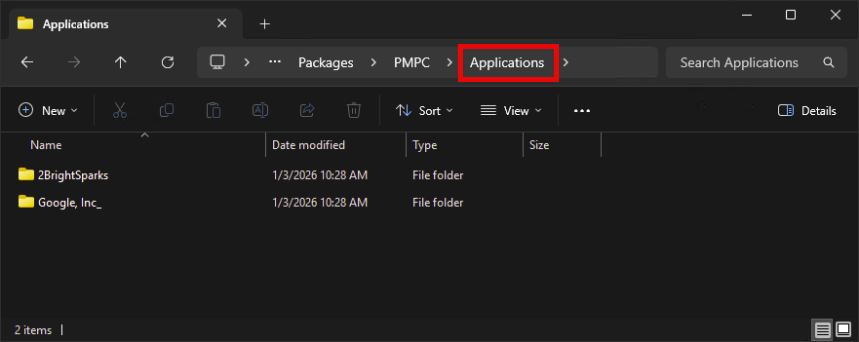
Publisher automatically creates a root folder called **Applications** (which cannot be changed) in the configured UNC source path.
{% endhint %}
All application content generated by Publisher is stored beneath this folder, with vendor and product-specific subfolders created automatically as applications are published.
{% hint style="success" %}
**Tip**
Each application version is stored in its own UniqueID folder. This results in multiple UniqueID folders under a single application folder, allowing Publisher to track individual application versions and manage application lifecycles correctly.
Application content is stored using the following structure:
**SourceFolder\Applications\Vendor\Application\UniqueID**
When application retention is enabled, retained application content UniqueID folders are moved into a **Retained Apps** folder under:
**SourceFolder\Applications\Vendor\Application.**
{% endhint %}
{% hint style="danger" %}
**Important**
The **Applications** folder structure is critical to Publisher operations. Publisher evaluates both the ConfigMgr database object and the corresponding content directories when making decisions about application retention, upgrades, and lifecycle management.
Manually modifying, moving, or deleting folders within this structure can cause inconsistencies between ConfigMgr and the content source, leading to unexpected behavior or management issues later.
{% endhint %}
{% hint style="info" %}
**Note**
See [Connection and Source Options](/patch-my-pc-publisher/manage/configmgr-apps-tab/base-install-options/connection-source.md) for more information.
{% endhint %}
## Microsoft SQL Permission Requirements
When Publisher is installed on the ConfigMgr site server, the Publisher service runs as SYSTEM and the site server’s computer account typically already has the required read permissions on the ConfigMgr site database. In this configuration, no additional SQL permissions are usually required.
If Publisher is installed on a different server, or if you choose to run the scan using a specific SQL or user account, the account used for the scan must be granted read access to the ConfigMgr database views used for application inventory.
To successfully scan the site database, the account needs **SELECT** permissions on the following SQL views in your ConfigMgr database:
* `v_Add_Remove_Programs`
* `v_GS_ADD_REMOVE_PROGRAMS`
* `v_GS_ADD_REMOVE_PROGRAMS_64`
* `v_GS_INSTALLED_SOFTWARE`
To drill into an application count and view the devices on which the selected application is installed, grant **Select** permission on:
* `v_R_System`
If collection filtering is used, also grant **Select** permission on:
* `v_FullCollectionMembership`
* `v_Collection`
These views contain the hardware inventory and collection membership data that the Publisher uses to determine which software is installed on which devices.
### Manually Add SQL Permissions
To grant access, add the computer account (for example, DOMAIN\PUBLISHER01$) or the user/SQL account as a login in SQL Server, map it to the ConfigMgr site database, and grant SELECT permissions on the required inventory and collection views. This ensures Publisher can successfully query installed application data during the scan.
If the required SQL permissions are not already in place, you can provide the following SQL query to your SQL administrator to run against the ConfigMgr site database.
{% hint style="success" %}
**Tip**
Before running this script, update the **database name** specified in the `USE` statement and replace the account value assigned to the `@UserName` variable with the appropriate computer or user account for your environment.
{% endhint %}
```sql
-- Replace CM_LA2 with the database name for your Configuration Manager environment
USE CM_LA2
GO
-- Replace CONTOSO\ServerName$ with the appropriate value for your environment
DECLARE @UserName nvarchar(128) = 'CONTOSO\ServerName$'
DECLARE @QuotedUserToGrant nvarchar(128) = QUOTENAME(@UserName)
IF NOT EXISTS(SELECT principal_id FROM sys.server_principals WHERE name = @UserName) BEGIN
DECLARE @LoginSQL as varchar(500)
SET @LoginSQL = 'CREATE LOGIN '+ @QuotedUserToGrant + ' FROM WINDOWS'
EXEC (@LoginSQL)
END
IF NOT EXISTS(SELECT principal_id FROM sys.database_principals WHERE name = @UserName) BEGIN
DECLARE @UserSQL as varchar(500)
SET @UserSQL = 'CREATE USER ' + @QuotedUserToGrant + ' FOR LOGIN ' + @QuotedUserToGrant
EXEC (@UserSQL)
END
DECLARE @PermissionsSQL as varchar(500)
SET @PermissionsSQL = 'GRANT SELECT ON dbo.v_Add_Remove_Programs TO ' + @QuotedUserToGrant +
'GRANT SELECT ON dbo.v_GS_ADD_REMOVE_PROGRAMS TO ' + @QuotedUserToGrant +
'GRANT SELECT ON dbo.v_GS_ADD_REMOVE_PROGRAMS_64 TO ' + @QuotedUserToGrant +
'GRANT SELECT ON dbo.v_GS_INSTALLED_SOFTWARE TO ' + @QuotedUserToGrant +
'GRANT SELECT ON dbo.v_R_System TO ' + @QuotedUserToGrant +
'GRANT SELECT ON dbo.v_FullCollectionMembership TO ' + @QuotedUserToGrant +
'GRANT SELECT ON dbo.v_Collection TO ' + @QuotedUserToGrant
EXEC (@PermissionsSQL)
```
Alternatively, you can manually assign the required permissions using SQL Server Management Studio:
1. Launch SQL Server Management Studio.
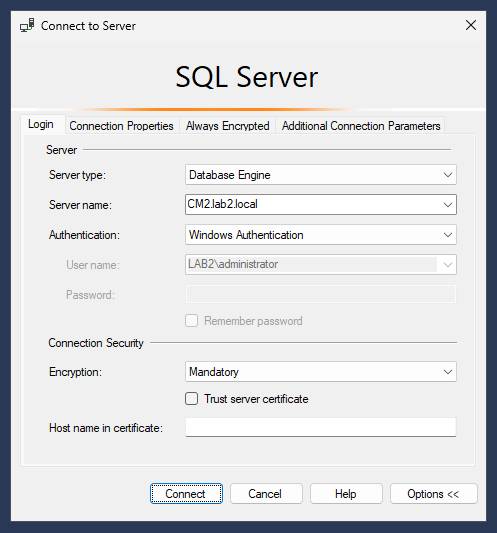
2. Connect to the SQL Server hosting the ConfigMgr site database.
3. Authenticate using an account with permissions to manage logins and database security.
4. In **Object Explorer**, expand **Security > Logins**.
5. Check whether the login already exists:
* **Windows computer account:** `DOMAIN\PUBLISHER01$`
* **Windows user account:** `DOMAIN\UserName`
* **SQL login:** (as provided by your DBA)
6. If the login already exists, reuse it and continue to step 9.
7. If the login does **not** exist:
* Right-click **Logins** and select **New Login…**
* For Windows accounts, click **Search…** and select the account
* For SQL logins, choose **SQL Server authentication** and enter the credentials
8. Click **OK** to create the login.
9. Right-click the newly created (or existing) login and select **Properties**.
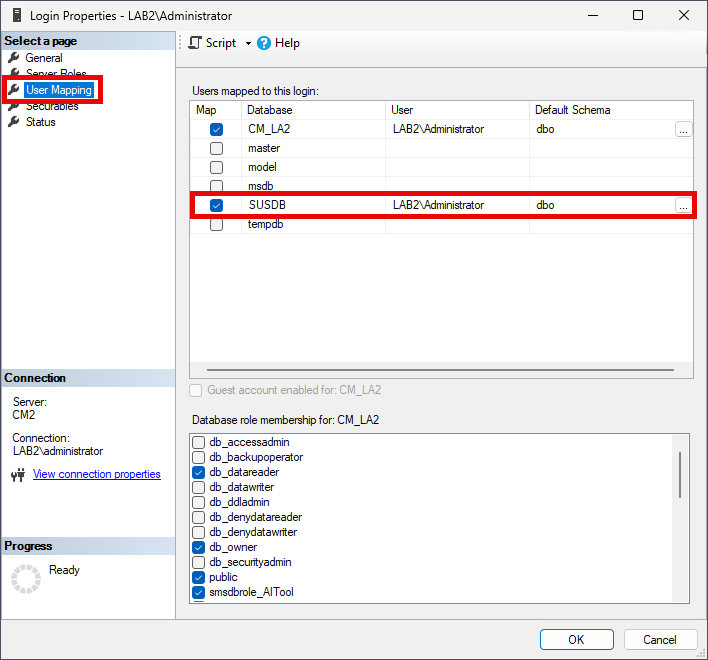
10. Select **User Mapping**.
11. Check whether the login is already mapped to your ConfigMgr site database (for example, `CM_LA2`).
12. If the database is **already selected**, continue to step 16.
13. If it is **not selected**, check the box next to the site database to create the mapping.
14. In the **database role membership** section, leave all roles **unchecked** (no database roles are required).
15. Click **OK** to save the changes.
16. Expand **Databases > CM\_\ > Views**
17. For each required view:
* Right-click the view
* Select **Properties**
* Go to **Permissions**
* Add the login if not already listed
* Grant **SELECT** permission
* **Required views:**
* `v_Add_Remove_Programs`
* `v_GS_ADD_REMOVE_PROGRAMS`
* `v_GS_ADD_REMOVE_PROGRAMS_64`
* `v_GS_INSTALLED_SOFTWARE`
* **Additional views (only if limiting scans to a collection):**
* `v_FullCollectionMembership`
* `v_Collection`
18. Click **OK** to save permissions.
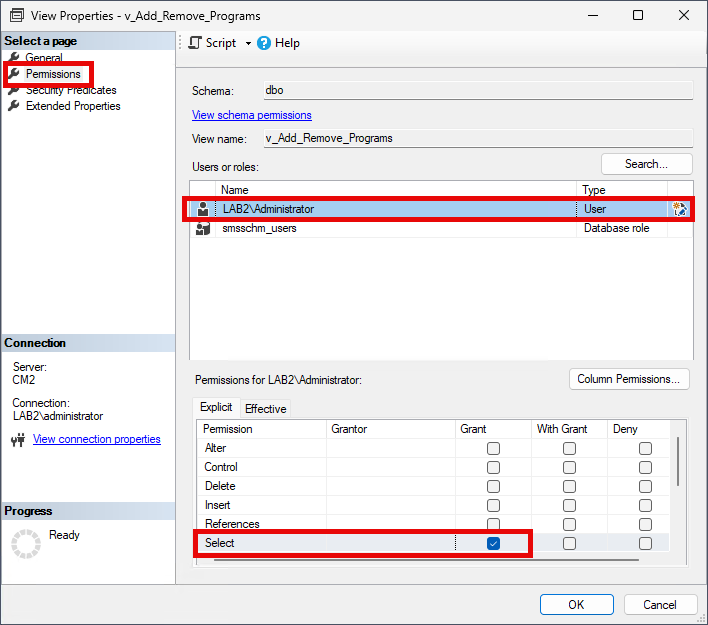
The example below shows how SELECT permission is granted on the v\_Add\_Remove\_Programs view using SQL Server Management Studio.
In this case, the account LAB2\Administrator has been added to the view’s Permissions page. With the account selected, the SELECT permission is explicitly granted, allowing the Publisher to read data from this view during the scan.
---
# Agent Instructions
This documentation is published with GitBook. GitBook is the documentation platform designed so that both humans and AI agents can read, navigate, and reason over technical content effectively. Learn more at gitbook.com.
## Querying This Documentation
If you need additional information that is not directly available in this page, you can query the documentation by asking a question.
Perform an HTTP GET request on the following URL with the `ask` and `goal` query parameters:
```
GET https://docs.patchmypc.com/patch-my-pc-publisher/requirements/configmgr-requirements/permissions.md?ask=&goal=
```
`ask` is the immediate question: it should be specific, self-contained, and written in natural language.
`goal` is what the user is ultimately trying to achieve, the reason they need the answer. Sharing it helps GitBook give you a better, more relevant answer. A goal is most helpful when it describes the outcome the user wants rather than restating the question. For example, with `ask=how do I create an API token`, a goal like `automate deployments from our CI pipeline` lets GitBook tailor the answer to that use case.
The response will contain a direct answer to the question and relevant excerpts and sources from the documentation.
Use this mechanism when the answer is not explicitly present in the current page, you need clarification or additional context, or you want to retrieve related documentation sections.