> For the complete documentation index, see [llms.txt](https://docs.patchmypc.com/llms.txt). Markdown versions of documentation pages are available by appending `.md` to page URLs; this page is available as [Markdown](https://docs.patchmypc.com/patch-my-pc-publisher/manage/intune-tabs/scan-intune/query-button.md).
# Query button in Patch My PC Publisher
*Applies to: Patch My PC Publisher V3.x*
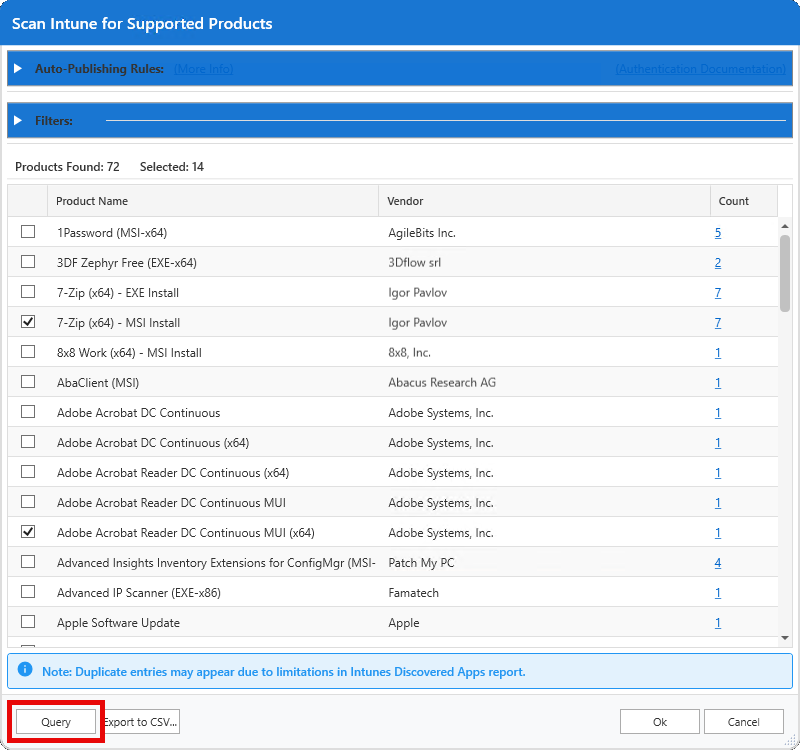
The **Query** button on the **Scan Intune** tab of Patch My PC (PMPC) Publisher performs an interactive scan using the current configuration defined on the screen and any applied filters.
When you click **Query**, Publisher queries the obtained Intune report and displays the results. The products shown reflect:
* What applications detected in the Intune report match products in the PMPC catalog.
* The device count for each product.
{% hint style="info" %}
**Note**
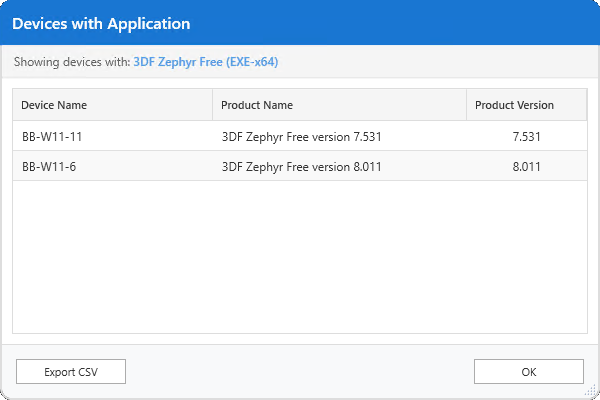
The device count value shown for each product match is clickable. Selecting it displays a detailed view of the devices and application versions where the product was detected, allowing you to validate inventory results before enabling or publishing the product.
{% endhint %}
The **Query** button does not enable or publish products by itself; it simply retrieves and displays the results based on the current settings, allowing you to review and validate findings before taking further action.
Selecting products from this list is equivalent to manually selecting the same products in the [Product Tree](/patch-my-pc-publisher/fundamentals/product-tree/working.md) either on the **Intune Apps** or **Intune Updates** tabs. When you check a product here, it enables that product for publishing in the same way as selecting it directly in the Product Tree.
{% hint style="danger" %}
**Important**
Because there is no universal standard for how vendors name apps, inventory results cannot always distinguish between multiple variants of the same product. For example, if **7-Zip (x64)** is detected in the Intune report, Publisher cannot reliably determine whether the MSI or EXE installer was originally used, so both variants may be shown as matches. This ensures coverage while acknowledging the limitations of vendor-provided inventory data.
{% endhint %}
### Count
The value shown in the **Count** column shown for each matched product is clickable. Clicking a count opens the **Devices with Application** screen listing the devices where the product was detected, along with the reported app version on each device.
This detailed view allows you to review inventory results and verify product presence and version distribution before enabling or publishing the product.
---
# Agent Instructions
This documentation is published with GitBook. GitBook is the documentation platform designed so that both humans and AI agents can read, navigate, and reason over technical content effectively. Learn more at gitbook.com.
## Querying This Documentation
If you need additional information that is not directly available in this page, you can query the documentation dynamically by asking a question.
Perform an HTTP GET request on the current page URL with the `ask` query parameter, and the optional `goal` query parameter:
```
GET https://docs.patchmypc.com/patch-my-pc-publisher/manage/intune-tabs/scan-intune/query-button.md?ask=&goal=
```
`ask` is the immediate question: it should be specific, self-contained, and written in natural language.
`goal` is optional and describes the broader end goal you are ultimately trying to accomplish on behalf of the user. GitBook uses it to tailor the answer towards what is most useful for that goal.
The response will contain a direct answer to the question and relevant excerpts and sources from the documentation.
Use this mechanism when the answer is not explicitly present in the current page, you need clarification or additional context, or you want to retrieve related documentation sections.