> For the complete documentation index, see [llms.txt](https://docs.patchmypc.com/llms.txt). Markdown versions of documentation pages are available by appending `.md` to page URLs; this page is available as [Markdown](https://docs.patchmypc.com/patch-my-pc-publisher/manage/advanced-tab/file-locations.md).
# File Locations category of Patch My PC Publisher
*Applies to: Patch My PC Publisher V3.x*
By default, Patch My PC (PMPC) Publisher downloads content and writes logs to locations derived from the system and installation context.
As Publisher runs under the SYSTEM account, default paths may not always align with organizational requirements for disk usage, monitoring, or security tooling.
The **File Locations** category on the **Advanced** tab allows you to customize:
* [Content Download Location](#customize-content-download-location)
* [Service Log Location](#customize-service-log-location)
* [Log File Size and Retention](#log-file-size-and-retention)
{% hint style="info" %}
**Note**
These settings apply only to Publisher and do not affect client-side installations.
{% endhint %}
## Customize Content Download Location
The **CUSTOMIZE CONTENT DOWNLOAD LOCATION** section allows you to configure settings related to content Publisher downloads.
### Downloads folder
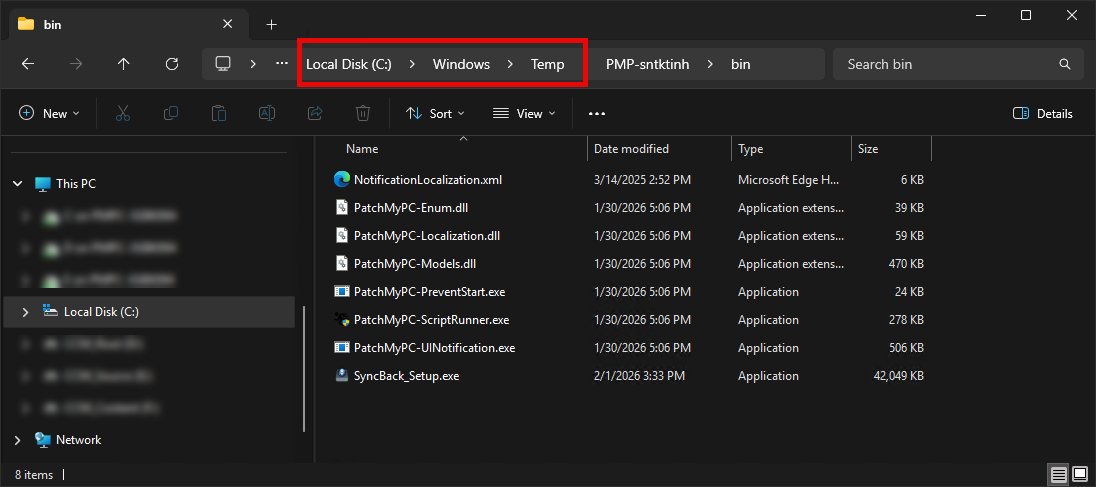
By default, content files are downloaded temporarily to `%Temp%` during publishing operations. As Publisher runs under the SYSTEM context, this typically resolves to:
```
C:\Windows\Temp
```
This following screenshot shows Publisher using `C:\Windows\Temp` as a temporary scratch location while preparing packages during a publishing sync.
{% hint style="info" %}
**Note**
Temporary content downloaded to this location is automatically removed once publishing operations complete.
{% endhint %}
To configure a different location, enter/browse to the required location, select it, then click **Apply** to save your changes.
## Customize Service Log Location
The **CUSTOMIZE SERVICE LOG LOCATION** section allows you to configure the **Service log folder** setting.
Publisher writes service and operational logs to disk to support troubleshooting, auditing, and support diagnostics.
By default, Publisher logs are stored within the installation folder of the Patch My PC Publishing Service:
* **Newer Publisher versions:**\
Logs, including **PatchMyPC.log**, are stored in a dedicated **`Logs`** subfolder under Publisher's installation folder. For example:
```
C:\Program Files\Patch My PC\Patch My PC Publishing Service\Logs
```
* **Older Publisher versions:**\
The primary **PatchMyPC.log** file may still be located directly in the root of the Publishing Service installation directory rather than the `Logs` subfolder.
As Publisher runs under the SYSTEM account, the computer account of the server hosting the Publishing Service must have write permissions to the configured log folder. If permissions are insufficient, logging may fail.
To configure a different location (not recommended, as adopting the default location makes troubleshooting easier), enter/browse to the required location, select it, then click **Apply** to save your changes.
## Log File Size and Retention
The **LOG FILE SIZE AND RETENTION** section allows you to configure the following settings:
* [Logs to retain](#logs-to-retain)
* [Max size (MB)](#max-size-mb)
### Logs to retain
The **Logs to retain** setting specifies how many log files to keep before overwriting older logs.
{% hint style="info" %}
**Note**
We recommend setting **Logs to retain** to **10**. Publisher log files are relatively small, and retaining additional history is extremely valuable when troubleshooting issues or providing support, as it preserves publishing context that may otherwise be lost.
{% endhint %}
### Max size (MB)
The **Max size (MB)** setting specifies the maximum size of each individual log file before a new log is created.
{% hint style="info" %}
**Note**
We recommend setting **Max size (MB)** to **10**. Publisher log files are relatively small, and retaining additional history is extremely valuable when troubleshooting issues or providing support, as it preserves publishing context that may otherwise be lost.
{% endhint %}
---
# Agent Instructions
This documentation is published with GitBook. GitBook is the documentation platform designed so that both humans and AI agents can read, navigate, and reason over technical content effectively. Learn more at gitbook.com.
## Querying This Documentation
If you need additional information that is not directly available in this page, you can query the documentation by asking a question.
Perform an HTTP GET request on the following URL with the `ask` and `goal` query parameters:
```
GET https://docs.patchmypc.com/patch-my-pc-publisher/manage/advanced-tab/file-locations.md?ask=&goal=
```
`ask` is the immediate question: it should be specific, self-contained, and written in natural language.
`goal` is what the user is ultimately trying to achieve, the reason they need the answer. Sharing it helps GitBook give you a better, more relevant answer. A goal is most helpful when it describes the outcome the user wants rather than restating the question. For example, with `ask=how do I create an API token`, a goal like `automate deployments from our CI pipeline` lets GitBook tailor the answer to that use case.
The response will contain a direct answer to the question and relevant excerpts and sources from the documentation.
Use this mechanism when the answer is not explicitly present in the current page, you need clarification or additional context, or you want to retrieve related documentation sections.