> For the complete documentation index, see [llms.txt](https://docs.patchmypc.com/llms.txt). Markdown versions of documentation pages are available by appending `.md` to page URLs; this page is available as [Markdown](https://docs.patchmypc.com/patch-my-pc-publisherv2/administration/advanced/arm-architecture-application-support.md).
# ARM Architecture Application Support
*Applies to: Patch My PC Publisher V2.x*
## Overview
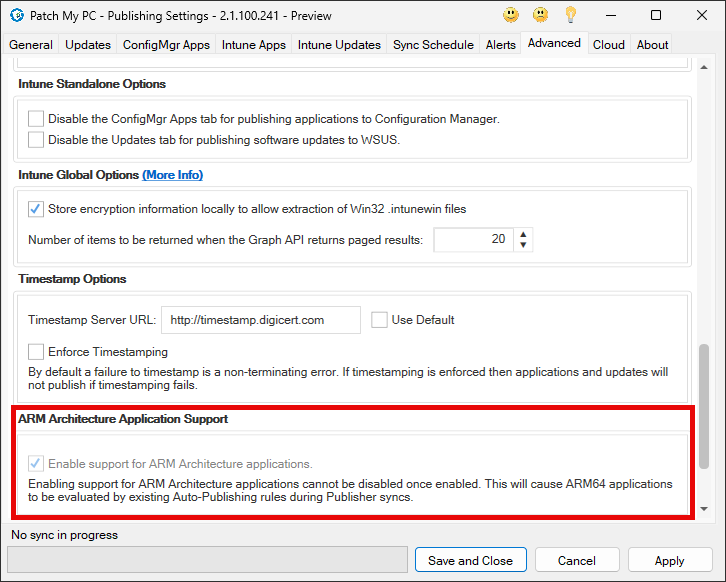
**ARM Architecture Application Support** controls whether the Publisher evaluates and publishes ARM64 applications.
## Enable support for ARM Architecture applications
When this option is enabled, the Publisher begins supporting ARM64 applications. ARM64 products are evaluated during Publisher syncs using existing auto publishing rules.
{% hint style="warning" %}
**Important**
Once enabled, this setting cannot be disabled.
{% endhint %}
Enabling this option causes ARM64 applications to be included in evaluation and publishing logic. Existing auto publishing rules are applied without modification, which may result in new ARM64 applications being published automatically.
Because the setting is permanent, it should be enabled only after confirming that ARM64 application support is required in the environment.
## ARM64 Application Naming
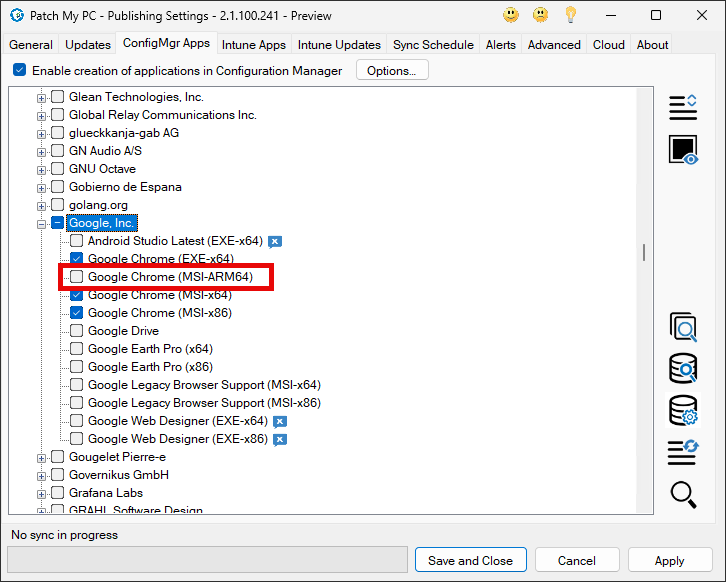
When ARM Architecture Application Support is enabled, ARM based applications are shown alongside existing products in the Publisher product tree(s) on the following tabs:
* Updates
* ConfigMgr Apps
* Intune Apps
* Intune Updates
ARM applications are identified by ARM64 appended to the application name. This naming clearly distinguishes ARM64 installers from x64 and x86 variants.
## Automatic Requirement Handling
For third party updates published to WSUS, ARM64 applicability is controlled by a well known detectoid defined in the Patch My PC catalog SDP. This detectoid limits the update so it is only applicable to supported architectures.
```xml
4103af66-247a-4782-b970-8899394c27c3
```
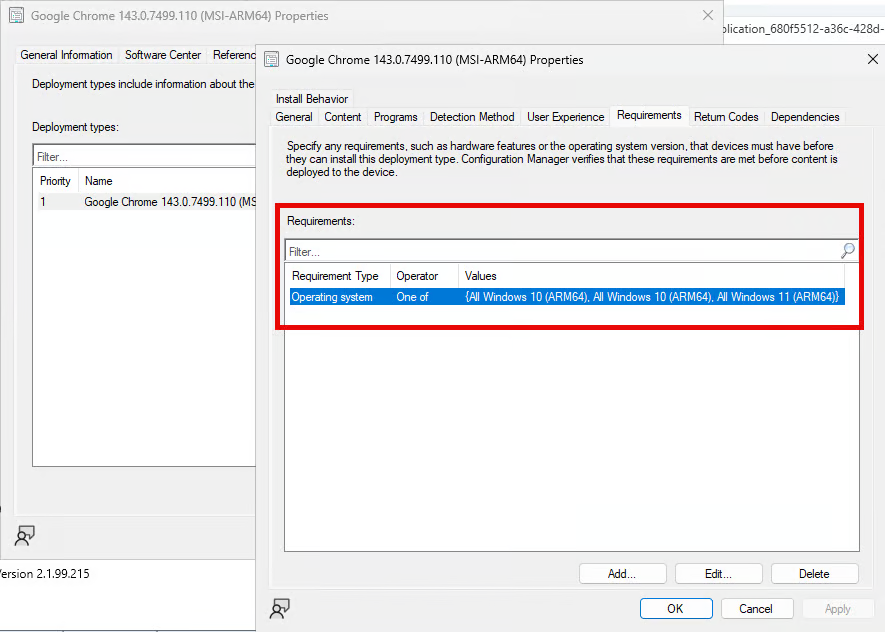
For ConfigMgr applications, ARM64 applications automatically include an operating system requirement that limits installation to Windows ARM64. This ensures the application is only offered to supported devices.
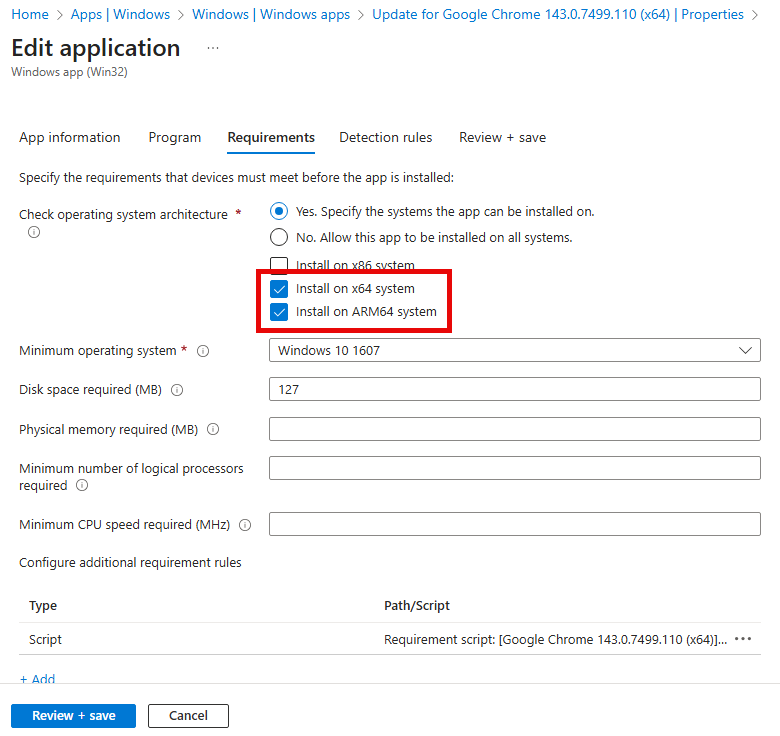
For Intune Win32 applications, the operating system architecture requirements are automatically configured during publishing. ARM64 applications are limited to ARM64 devices, while most x64 applications are allowed to install on both x64 and ARM64 devices.
## Assignments
Architecture-specific apps may report as Installed on devices with a different architecture due to a known detection script limitation. This is a reporting issue only and does not result in any software being installed. See [ARM64 update may show as Installed on x64 devices](https://patchmypc.com/kb/arm64-update-may-show-as-installed-on-x64-devices/) for details and a recommended workaround.
---
# Agent Instructions
This documentation is published with GitBook. GitBook is the documentation platform designed so that both humans and AI agents can read, navigate, and reason over technical content effectively. Learn more at gitbook.com.
## Querying This Documentation
If you need additional information that is not directly available in this page, you can query the documentation by asking a question.
Perform an HTTP GET request on the following URL with the `ask` and `goal` query parameters:
```
GET https://docs.patchmypc.com/patch-my-pc-publisherv2/administration/advanced/arm-architecture-application-support.md?ask=&goal=
```
`ask` is the immediate question: it should be specific, self-contained, and written in natural language.
`goal` is what the user is ultimately trying to achieve, the reason they need the answer. Sharing it helps GitBook give you a better, more relevant answer. A goal is most helpful when it describes the outcome the user wants rather than restating the question. For example, with `ask=how do I create an API token`, a goal like `automate deployments from our CI pipeline` lets GitBook tailor the answer to that use case.
The response will contain a direct answer to the question and relevant excerpts and sources from the documentation.
Use this mechanism when the answer is not explicitly present in the current page, you need clarification or additional context, or you want to retrieve related documentation sections.