> For the complete documentation index, see [llms.txt](https://docs.patchmypc.com/llms.txt). Markdown versions of documentation pages are available by appending `.md` to page URLs; this page is available as [Markdown](https://docs.patchmypc.com/patch-my-pc-cloud/technical-references/about-code-signing-certificates.md).
# About the Patch My PC Code-Signing Certificates
*Applies to: Patch My PC Cloud*
## Overview
Patch My PC (PMPC) signs PowerShell scripts and modules with a code-signing certificate from a public Certificate Authority (CA).
For scripts and modules to run correctly under an [AllSigned execution policy](https://learn.microsoft.com/en-us/powershell/module/microsoft.powershell.core/about/about_execution_policies?view=powershell-7.4), the public key of the code-signing certificate must be present in the Trusted Publishers certificate store on all relevant computers you intend to target with a [Deployment](/patch-my-pc-cloud/deployments.md).
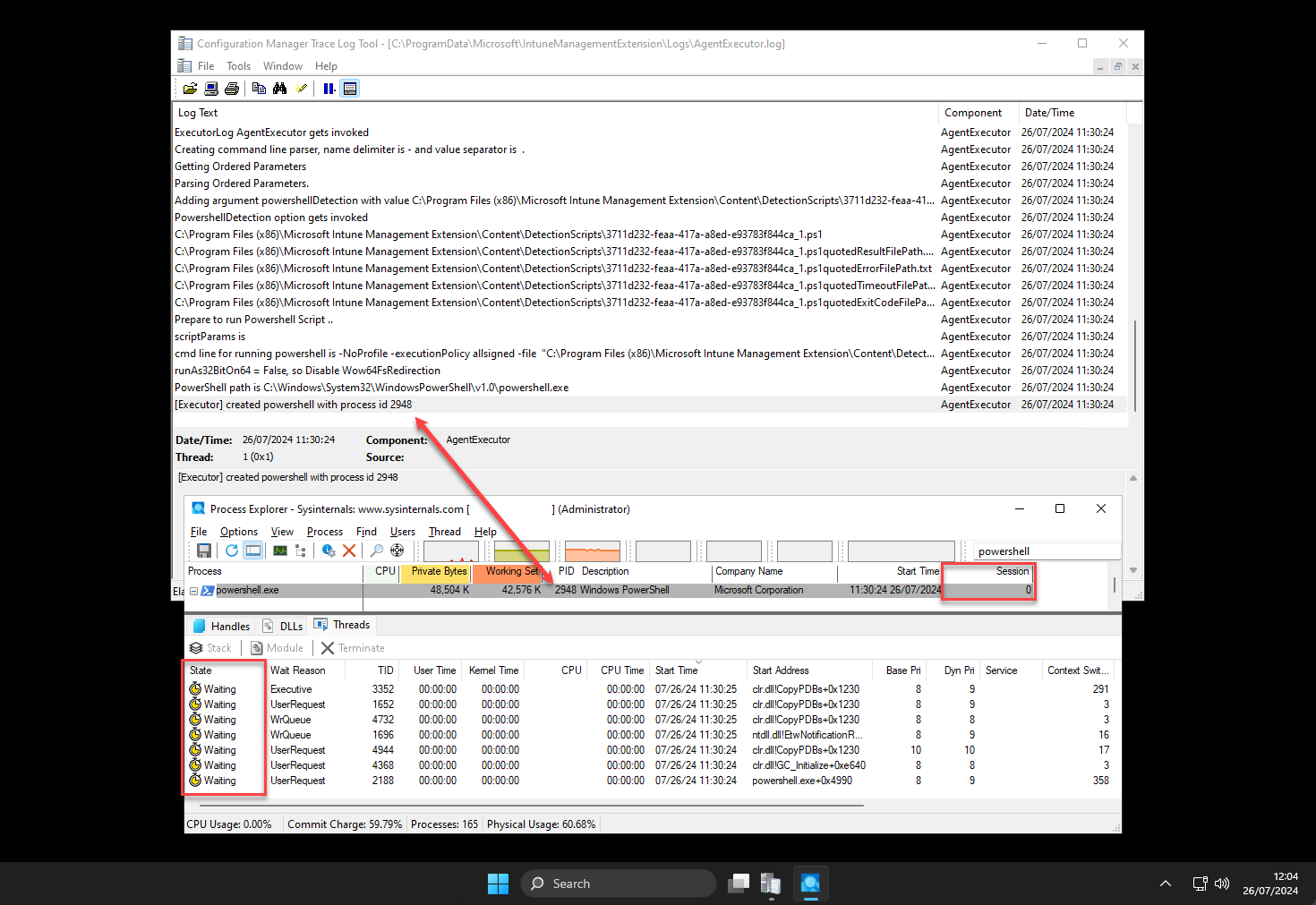
If the public key is not trusted, PowerShell may wait for the certificate trust prompt to be accepted. For Intune detection and requirement scripts, this prompt is not visible to the logged-on user because the script runs in session 0. See [Intune Detection and Requirement Script Execution](#intune-detection-and-requirement-scripts) for more information about policies that may impact script execution, and how to identify this behavior in the Intune Management Extension logs.
Additionally, in environments using application control technologies such as Windows Defender Application Control (WDAC), AppLocker, or similar controls, the relevant Patch My PC code-signing certificate may need to be explicitly trusted or allowlisted for the signed scripts or modules to run.
{% hint style="danger" %}
**Important**
Patch My PC **only** signs scripts that we author. Any customer-provided scripts added using the [Cloud "Scripts" Deployment Tool](/patch-my-pc-cloud/deployments/deploy-app/configurations-tab/additional-tools/scripts.md) will not be signed with the Patch My PC code-signing certificate.
{% endhint %}
## Certificates used
Patch My PC uses 3 separate code-signing certificates for the following scenarios.
### **1. Intune Detection and Requirement Scripts**
Used to sign Intune detection and requirement scripts for Win32 applications published through PMPC Cloud.See the [Intune Detection and Requirement Script Execution](#intune-detection-and-requirement-script-execution) section for more information about policies that may impact script execution, and how to identify this behavior in the Intune Management Extension logs.
### **2. Patch My PC Helper Scripts**
Used to sign required and recommended pre/post "helper" scripts for certain applications in the PMPC catalog. These helper scripts perform essential tasks such as stopping processes, uninstalling older software versions, or configuring application behavior during deployment to ensure successful app installation.
### **3. PSAppDeployToolkit Module**
Used to sign the PSAppDeployToolkit module included with deployments that use Modern branding or PSADT-based functionality.
When PSADT integration is enabled, the module is added to the deployment package and imported at runtime. Patch My PC uses this module for Modern branding experiences and for PSADT cmdlets used by supported pre-script and post-script actions.
## Deploying a Certificate from Intune
You can use Intune to deploy a Patch My PC code-signing certificate to managed devices. This installs the certificate into the local Trusted Publishers certificate store so PowerShell can trust scripts and modules signed by Patch My PC.
You have two deployment options:
* [Using a Custom Configuration Policy](/patch-my-pc-cloud/technical-references/about-code-signing-certificates/using-custom-configuration-policy-deploy-pmpc-certificate.md) (recommended)
* [Using a script](/patch-my-pc-cloud/technical-references/about-code-signing-certificates/using-a-script-to-deploy-a-pmpc-certificate.md)
{% hint style="info" %}
**Note**
If you prefer to deploy a certificate using a method not described here, see [Download PMPC Code-Signing Certificates](/patch-my-pc-cloud/technical-references/about-code-signing-certificates/download-pmpc-code-signing-certificates.md).
{% endhint %}
{% hint style="danger" %}
**Important**
In addition, the computer must trust the certificate chain for the code-signing certificate, which is generally the case with certificates issued by public CAs. By importing the code-signing certificate's public key into the Trusted Publishers store, you ensure PowerShell can successfully verify and run the signed scripts.
{% endhint %}
## Intune Detection and Requirement Script Execution
Specifically for Intune detection and requirement scripts, **AgentExecutor.exe** (the Intune client process responsible for calling Win32 app detection or requirement scripts) runs in session 0; it is not visible by the logged on user and PowerShell is awaiting input by the user to accept the code-signing certificate.
powershell.exe waiting for user input
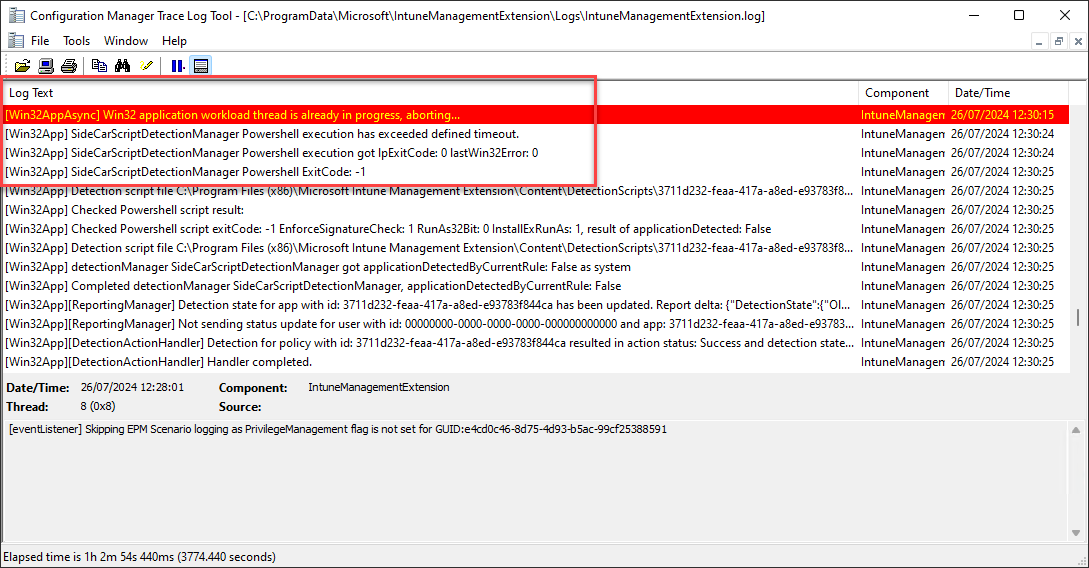
The Intune Management Extension enforces a hardcoded 60-minute timeout for PowerShell script execution. This timeout is not configurable.
If the script is still running after 60 minutes, the Intune Management Extension service terminates the powershell.exe process and records entries similar to the following in IntuneManagementExtension.log.
powershell.exe being terminated after 60 minutes timeout
---
# Agent Instructions
This documentation is published with GitBook. GitBook is the documentation platform designed so that both humans and AI agents can read, navigate, and reason over technical content effectively. Learn more at gitbook.com.
## Querying This Documentation
If you need additional information that is not directly available in this page, you can query the documentation by asking a question.
Perform an HTTP GET request on the following URL with the `ask` and `goal` query parameters:
```
GET https://docs.patchmypc.com/patch-my-pc-cloud/technical-references/about-code-signing-certificates.md?ask=&goal=
```
`ask` is the immediate question: it should be specific, self-contained, and written in natural language.
`goal` is what the user is ultimately trying to achieve, the reason they need the answer. Sharing it helps GitBook give you a better, more relevant answer. A goal is most helpful when it describes the outcome the user wants rather than restating the question. For example, with `ask=how do I create an API token`, a goal like `automate deployments from our CI pipeline` lets GitBook tailor the answer to that use case.
The response will contain a direct answer to the question and relevant excerpts and sources from the documentation.
Use this mechanism when the answer is not explicitly present in the current page, you need clarification or additional context, or you want to retrieve related documentation sections.