> For the complete documentation index, see [llms.txt](https://docs.patchmypc.com/llms.txt). Markdown versions of documentation pages are available by appending `.md` to page URLs; this page is available as [Markdown](https://docs.patchmypc.com/patch-my-pc-cloud/migration/how-different-apps-migrated/migrate-psadt-based-apps.md).
# Migrate PSADT-based Apps
*Applies to: Patch My PC Cloud*
When applications are inventoried from Microsoft Configuration Manager (ConfigMgr), Patch My PC (PMPC) Cloud analyzes the application metadata to determine how the application is installed and how it should be migrated. As part of this process, the installation command line is evaluated, and the primary installer file is identified from the application’s content source folder.
## Identifying a PSADT-based App
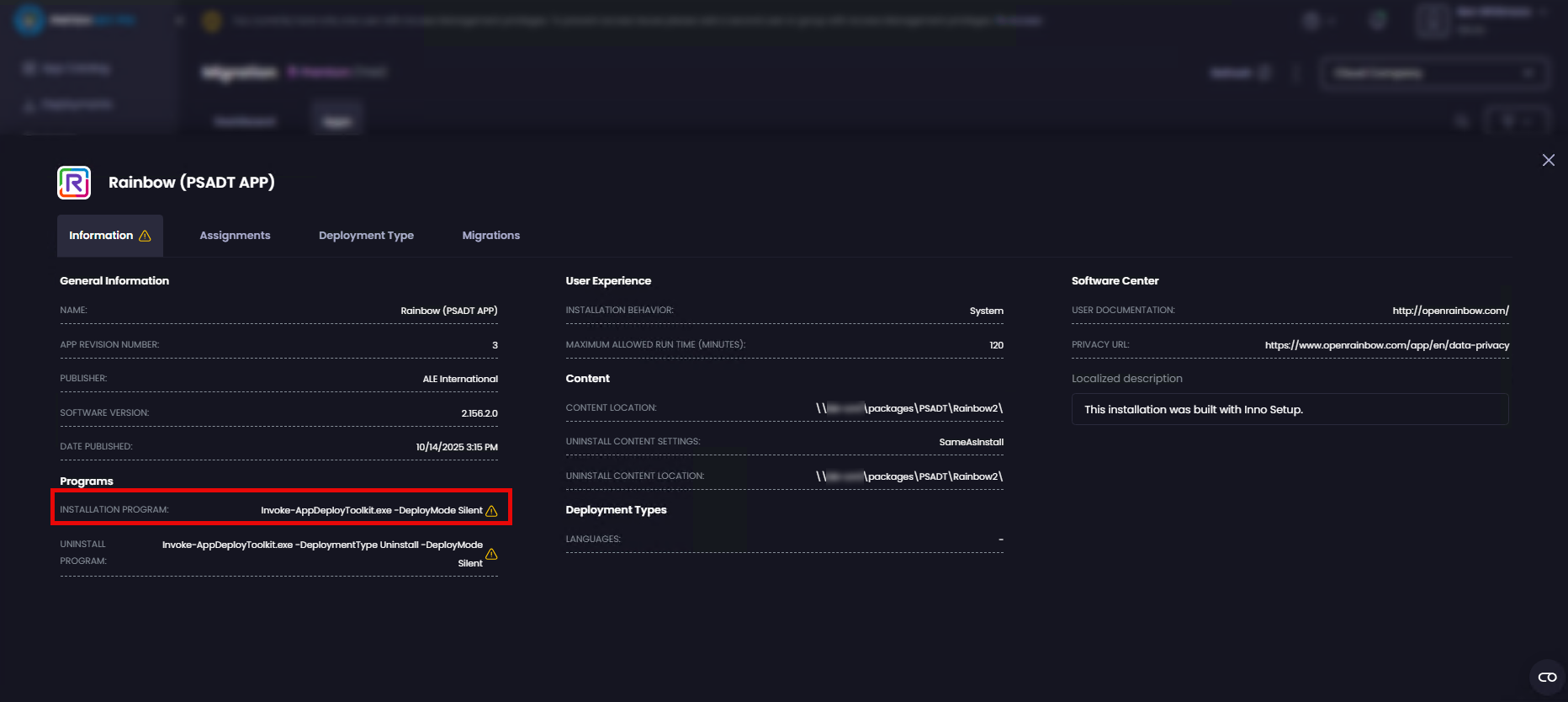
ConfigMgr does not explicitly label an application as PSADT-based. In most cases, the easiest way to confirm that an application is PSADT-based is to select the application from the Migration dashboard and review the **Installation Program** field.
If the **Installation Program** contains a **Deploy-Application.exe**, **Deploy-Application.ps1**, **Invoke-AppDeployToolkit.exe** or **Invoke-AppDeployToolkit.ps1**, the application can be considered PSADT-based.
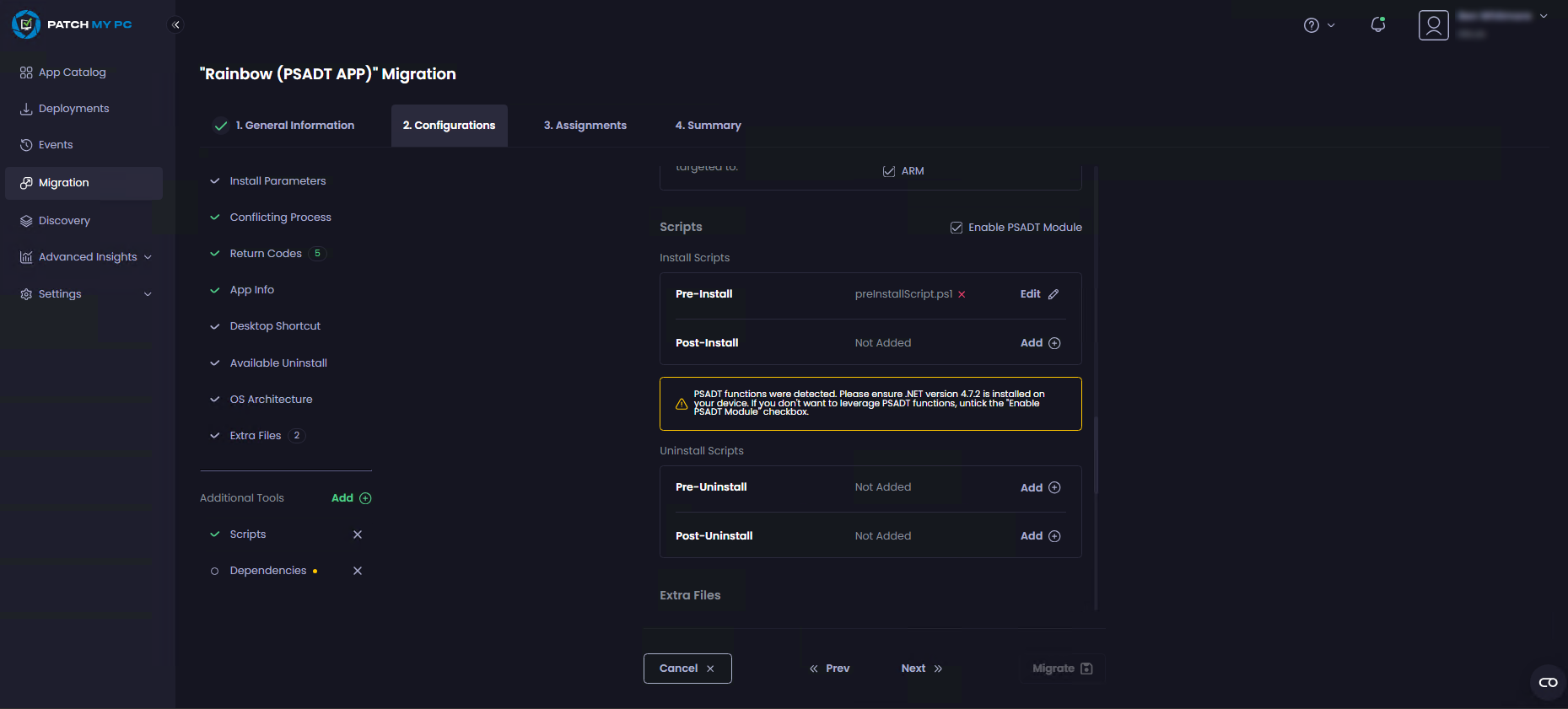
During the migration deployment flow, the **Configuration** tab indicates when an application has been identified as PSADT-based. Detection is based on the presence of PSADT functions in the script; when detected, the PSADT module is automatically enabled. The script content is analyzed and logically split into pre-install and post-install scripts.
When migrating PSADT-based applications, AI can assist with parsing the PowerShell script and identifying key components, including the primary installer and the **MARK: Pre-Install**, **MARK: Install**, and **MARK: Post-Install** sections. This allows the script to be accurately split around the main installer and mapped to the appropriate pre-install and post-install execution stages.
Without AI assistance, reliably separating PSADT scripts into pre-install and post-install logic can be challenging, particularly when scripts are heavily customized or do not follow common PSADT structures. AI-assisted analysis improves accuracy in identifying the primary installer and its surrounding MARK logic, enabling more applications to be migrated successfully.
{% hint style="info" %}
**Note**
**AI usage is optional** and can be **disabled at any time** from the Cloud Portal settings. See [Manage Cloud AI Usage](/patch-my-pc-cloud/manage/settings/company-settings/ai-usage.md) for more information.
{% endhint %}
## Migration Behavior of PSADT-based Apps
When the application is migrated, **PatchMyPC-ScriptRunner.exe** becomes the primary installer and orchestrates execution of the pre-install script, main installer, and post-install script. This model preserves the original installation behavior whilst enabling PMPC–specific enhancements that would not be possible with a simple “lift and shift” migration.
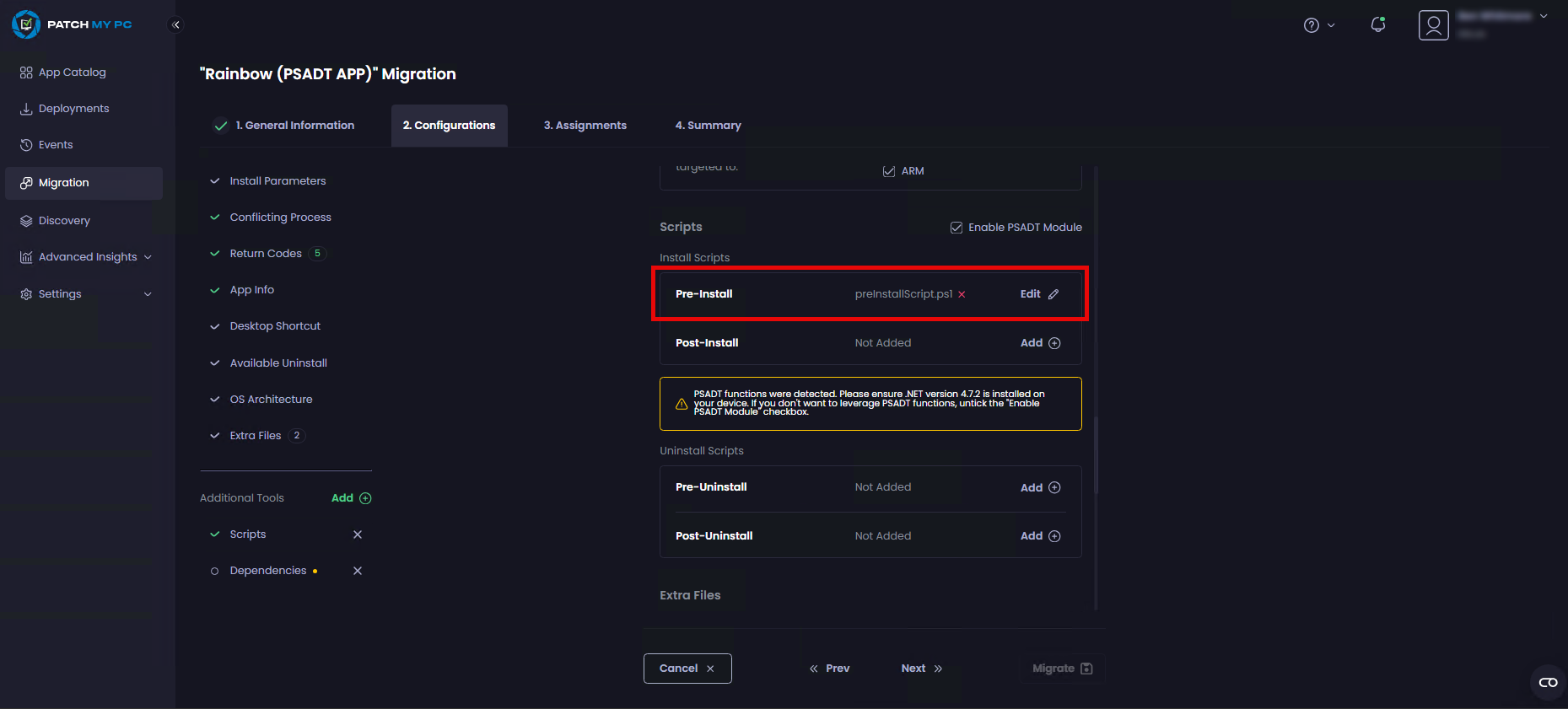
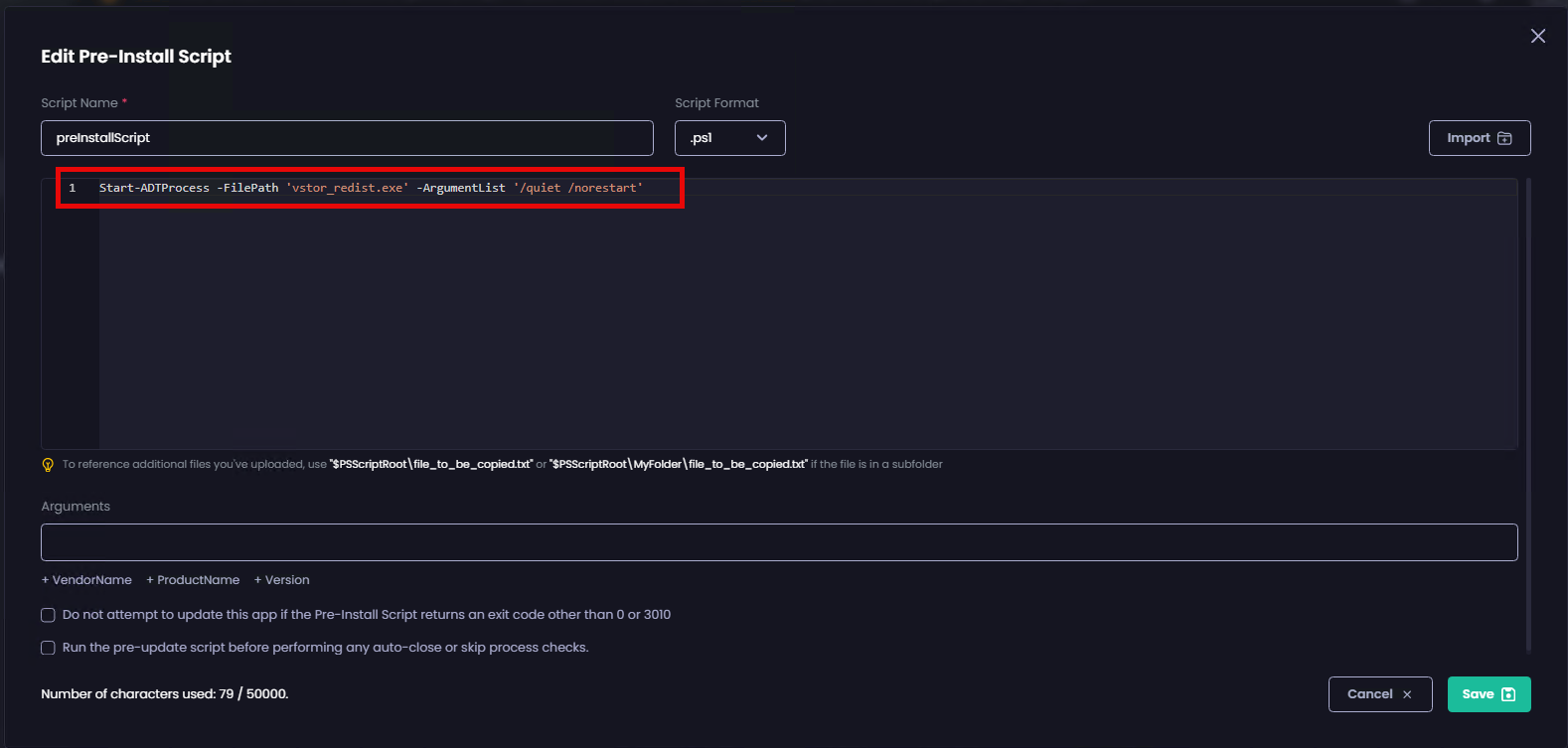
In the example below, the Rainbow application has been identified as PSADT-based, and the PSADT script has been automatically split during the migration flow. Logic originally contained within the **MARK: Pre-Install** section of the PSADT script has been mapped to the Pre-install script.
In the original PSADT script for Rainbow, both the **MARK: Pre-Install** and **MARK: Install** sections contain executable actions.
The pre-install section runs a prerequisite installer (**vstor\_redist.exe**), whilst the install section performs the primary application installation (**Rainbow\_Installer\_Machine\_Offline.msi**). During migration, these sections are analyzed and separated so that prerequisite logic is mapped to the **Pre-install** script, and the primary installer is executed as the main install action, preserving the original execution order.
You can edit any generated Pre-install and Post-install scripts to review whether PMPC Cloud has correctly identified the **MARK: Pre-Install**, **MARK: Install**, and **MARK: Post-Install** execution order.
{% hint style="danger" %}
**Important**\
Because the original PSADT script is split into separate Pre-install and Post-install scripts during migration, any existing code signature is invalidated. If script signing is required in your environment, export the generated script blocks, re-sign them, and then re-import them before completing the migration.
Also, you need to ensure .NET version 4.7.2 is installed on any devices to which this app will be deployed.
{% endhint %}
## Preserved Properties of PSADT-based Apps
The following information indicates the properties that are carried forward from the ConfigMgr application to the migration deployment flow when the application is matched to:
* [PMPC Catalog App](#pmpc-catalog-app-properties-preserved)
* [PMPC Custom App](#pmpc-custom-app-properties-preserved)
{% hint style="info" %}
**Note**
See [How Migration Type is Determined](/patch-my-pc-cloud/migration/how-migration-type-determined.md) to understand how ConfigMgr applications are matched during migration.
{% endhint %}
### PMPC Catalog App Properties Preserved
* Source Files (the main installer file will be replaced with the current version of the matched application in the Patch My PC catalog)
* DisplayName
* Return Codes
* Vendor
* Description
* Information URL
* Privacy URL
* PSADT Script
* "MARK: Pre-Install" mapped to Pre-install Script
* "MARK: Post-Install" mapped to Post-Install Script
{% hint style="info" %}
**Note**\
If more than one action is detected in a MARK install section, additional actions are reassigned to the **MARK: Pre-Install** or **MARK: Post-Install** scripts, as only one action can run in the main install stage.
{% endhint %}
### PMPC Custom App Properties Preserved
* Source Files
* DisplayName
* Vendor
* Description
* Version
* Return Codes
* Information URL
* Privacy URL
* PSADT Script
* "MARK: Pre-Install" mapped to Pre-install Script
* "MARK: Post-Install" mapped to Post-Install Script
{% hint style="info" %}
**Note**\
If more than one action is detected in a MARK install section, additional actions are reassigned to the **MARK: Pre-Install** or **MARK: Post-Install** scripts, as only one action can run in the main install stage.
{% endhint %}
* Detection Rules
---
# Agent Instructions
This documentation is published with GitBook. GitBook is the documentation platform designed so that both humans and AI agents can read, navigate, and reason over technical content effectively. Learn more at gitbook.com.
## Querying This Documentation
If you need additional information that is not directly available in this page, you can query the documentation by asking a question.
Perform an HTTP GET request on the following URL with the `ask` and `goal` query parameters:
```
GET https://docs.patchmypc.com/patch-my-pc-cloud/migration/how-different-apps-migrated/migrate-psadt-based-apps.md?ask=&goal=
```
`ask` is the immediate question: it should be specific, self-contained, and written in natural language.
`goal` is what the user is ultimately trying to achieve, the reason they need the answer. Sharing it helps GitBook give you a better, more relevant answer. A goal is most helpful when it describes the outcome the user wants rather than restating the question. For example, with `ask=how do I create an API token`, a goal like `automate deployments from our CI pipeline` lets GitBook tailor the answer to that use case.
The response will contain a direct answer to the question and relevant excerpts and sources from the documentation.
Use this mechanism when the answer is not explicitly present in the current page, you need clarification or additional context, or you want to retrieve related documentation sections.