# "Intune" Page of the Patch My PC Advanced/Patch Insights for Intune Dashboard

*Applies to: Advanced/Patch Insights for Intune*

All Intune dashboard views are populated with data obtained from the customer's Microsoft Intune tenant via Microsoft Graph API.

The **Intune** dashboard page consists of the following five tabs, each containing a collection of dashboard items.

<table data-header-hidden><thead><tr><th width="122" align="center" valign="top"></th><th width="143.99993896484375" align="center" valign="top"></th><th width="128.77783203125" align="center" valign="top"></th><th width="145.77783203125" align="center" valign="top"></th><th width="172.6961669921875" align="center" valign="top"></th></tr></thead><tbody><tr><td align="center" valign="top"><a href="#devices-tab">Devices tab</a></td><td align="center" valign="top"><a href="#applications-tab">Applications tab</a></td><td align="center" valign="top"><a href="#compliance-tab">Compliance tab</a></td><td align="center" valign="top"><a href="#configuration-tab">Configuration tab</a></td><td align="center" valign="top"><a href="#operating-systems-tab">Operating Systems tab</a></td></tr></tbody></table>

<figure><img src="https://3773699522-files.gitbook.io/~/files/v0/b/gitbook-x-prod.appspot.com/o/spaces%2F-MX7dvS0r_4fc0AikgJS%2Fuploads%2FQmgXdCkATl3ZR9Kf6qKs%2Fimage.png?alt=media&#x26;token=3b37ec8b-c64f-4215-b8a2-21b568bcb4b8" alt="Intune tabs" width="563"><figcaption></figcaption></figure>

{% hint style="info" %}
**Note**

All views across all tabs apply only to Windows and macOS information.
{% endhint %}

On the first time launch of a tab view, a data-caching process is run to collect data that populates the dashboard items. This is designed to make browsing around the dashboard items and click-through responsiveness much quicker once caching is complete.

Depending on the number of managed devices, apps, and related data in the Intune tenant, the caching process may take a few minutes to complete.

<figure><img src="https://3773699522-files.gitbook.io/~/files/v0/b/gitbook-x-prod.appspot.com/o/spaces%2F-MX7dvS0r_4fc0AikgJS%2Fuploads%2FPc6GTguexDegpa66AMon%2Fimage.png?alt=media&#x26;token=84051c75-98f2-4b2a-8281-cf4d85c48fcf" alt="Status message" width="563"><figcaption></figcaption></figure>

## Devices tab

All dashboard items in this view are populated using properties from managed devices.

<figure><img src="https://3773699522-files.gitbook.io/~/files/v0/b/gitbook-x-prod.appspot.com/o/spaces%2F-MX7dvS0r_4fc0AikgJS%2Fuploads%2FbQta2mGWMsDaeADQP2tE%2Fimage.png?alt=media&#x26;token=94c55b4c-6f18-490e-8537-c3e6b288dccb" alt="&#x27;Devices&#x27; tab" width="563"><figcaption></figcaption></figure>

### Managed Devices (Dash-stat)

Provides a total count of all Windows and macOS devices. The footer item uses the **complianceState** property to show a count of non-compliant devices.

<figure><img src="https://3773699522-files.gitbook.io/~/files/v0/b/gitbook-x-prod.appspot.com/o/spaces%2F-MX7dvS0r_4fc0AikgJS%2Fuploads%2F9HXlbUmQe9Kk00I6MkbB%2Fimage.png?alt=media&#x26;token=58344e7e-fa57-4b4c-a83c-6ecc09434c0d" alt="Managed Devices (Dash-stat)" width="442"><figcaption></figcaption></figure>

Clicking this item loads a table list view of the full dataset. Each device listed in the table can also be clicked to launch the specific device modal.

**General** tab shows managed device properties.

<figure><img src="https://3773699522-files.gitbook.io/~/files/v0/b/gitbook-x-prod.appspot.com/o/spaces%2F-MX7dvS0r_4fc0AikgJS%2Fuploads%2Fk0CGjK1kpx0TuMgZl3nD%2Fimage.png?alt=media&#x26;token=3ca759e8-3ebd-4104-b513-a7c0f97e3e84" alt="&#x27;General&#x27; tab" width="563"><figcaption></figcaption></figure>

**Apps** tab shows the managed app installation states for the specific device. The additional tabs (**Required Apps** and **Available Apps**), show lists of apps based on their install intent, which is read from the **assignments** property. Each item in the list can be clicked to launch the specific app modal.

<figure><img src="https://3773699522-files.gitbook.io/~/files/v0/b/gitbook-x-prod.appspot.com/o/spaces%2F-MX7dvS0r_4fc0AikgJS%2Fuploads%2Fa5EnhtRBy6WPMpgjO3Ph%2Fimage.png?alt=media&#x26;token=2a4901b0-6aa7-4401-8b9f-7f396e6a91e0" alt="&#x27;App&#x27; tab" width="563"><figcaption></figcaption></figure>

**Discovered apps** tab shows a list of discovered apps from Intune device inventory.

<figure><img src="https://3773699522-files.gitbook.io/~/files/v0/b/gitbook-x-prod.appspot.com/o/spaces%2F-MX7dvS0r_4fc0AikgJS%2Fuploads%2FDCiz15hWtziuqBgW22qw%2Fimage.png?alt=media&#x26;token=043cec8d-dc78-464c-b916-3925c2a3adb5" alt="&#x27;Discovered apps&#x27; tab" width="563"><figcaption></figcaption></figure>

Each item in the list can be clicked to launch the specific discovered app modal.

### Low Disk Space % (Dash-stat)

Provides a count of all Windows and macOS devices with less than 20% free space of the system drive. This item uses both the **totalStorageSpaceInBytes** and **freeStorageSpaceInBytes** properties to calculate the counts.

<figure><img src="https://3773699522-files.gitbook.io/~/files/v0/b/gitbook-x-prod.appspot.com/o/spaces%2F-MX7dvS0r_4fc0AikgJS%2Fuploads%2Fr96RPPKQ9H7xgSc7AI6k%2Fimage.png?alt=media&#x26;token=05853352-fa0b-41a3-9586-63ceef2e16a0" alt="Low Disk Space % (Dash-stat)" width="438"><figcaption></figcaption></figure>

Clicking this item loads a table list view of the full dataset. Each device listed in the table can be clicked to launch the specific device modal.

### Device Encryption (Dash-stat)

Provides a count of the encryption status of all Windows and macOS devices, and uses the **isEncrypted** property for the count.

<figure><img src="https://3773699522-files.gitbook.io/~/files/v0/b/gitbook-x-prod.appspot.com/o/spaces%2F-MX7dvS0r_4fc0AikgJS%2Fuploads%2FGCX1q4eXHMm4qU4KeHtt%2Fimage.png?alt=media&#x26;token=c2fb8121-eec5-4fac-ac16-bd5cd50a62d0" alt="Device Encryption (Dash-stat)" width="438"><figcaption></figcaption></figure>

Clicking this item loads a table list view of the full dataset. Each device listed in the table can also be clicked to launch the specific device modal.

### Stale Devices (Dash-stat)

Provides a count of all Windows and macOS devices that have not reported a successful Intune device check-in for over 45 days. This item uses the **lastSyncDateTime** property for the count.

<figure><img src="https://3773699522-files.gitbook.io/~/files/v0/b/gitbook-x-prod.appspot.com/o/spaces%2F-MX7dvS0r_4fc0AikgJS%2Fuploads%2F07flW6ww5aEJCFkB2Kfi%2Fimage.png?alt=media&#x26;token=657dabaa-b6c9-4925-b521-9b654a3bfae6" alt="Stale Devices (Dash-stat)" width="438"><figcaption></figcaption></figure>

Clicking this item loads a table list view of the full dataset. Each device listed in the table can also be clicked to launch the specific device modal.

### Device Types (Donut chart)

Provides a count of Windows and macOS managed device types. This uses the **deviceOperatingSystemSummary** property from the **ManagedDeviceOverview** endpoint.

<figure><img src="https://3773699522-files.gitbook.io/~/files/v0/b/gitbook-x-prod.appspot.com/o/spaces%2F-MX7dvS0r_4fc0AikgJS%2Fuploads%2FBJfWnunWYAbEelJe2SdX%2Fimage.png?alt=media&#x26;token=e28f043f-6e65-46e3-ace4-e60b546640b7" alt="Device Types (Donut chart)" width="434"><figcaption></figcaption></figure>

Clicking any item in the donut chart loads a table list view of the full dataset related to the clicked item. Each device listed in the table can be clicked to open the corresponding device modal.

### Device Manufacturers (Donut chart)

Provides a count of Windows and macOS managed device manufacturers, and uses the **manufacturer** property for the counts.

<figure><img src="https://3773699522-files.gitbook.io/~/files/v0/b/gitbook-x-prod.appspot.com/o/spaces%2F-MX7dvS0r_4fc0AikgJS%2Fuploads%2FoQ5AN4R4mGn4zxyMy4ho%2Fimage.png?alt=media&#x26;token=cc7c67f8-4569-4307-a4b4-8dd3aef10ea3" alt="Device Manufacturers (Donut chart)" width="436"><figcaption></figcaption></figure>

Clicking any item in the donut chart loads a table list view of the full dataset related to the clicked item. Each device listed in the table can be clicked on to launch the specific device modal.

### Device Models (Donut chart)

Provides a count of Windows and macOS managed device models, and uses the **model** for the counts.

<figure><img src="https://3773699522-files.gitbook.io/~/files/v0/b/gitbook-x-prod.appspot.com/o/spaces%2F-MX7dvS0r_4fc0AikgJS%2Fuploads%2FLcGbjYT87X9VMqr0WadJ%2Fimage.png?alt=media&#x26;token=f4e950b9-aa3f-40f4-bb43-8e153aeaf234" alt="Device Models (Donut chart)" width="442"><figcaption></figcaption></figure>

Clicking any item in the donut chart loads a table list view of the full dataset related to the clicked item. Each device listed in the table can be clicked on to launch the specific device modal.

### Managed Devices - Last Check-in (Donut chart)

Provides a count of Windows and macOS managed device last check-in data/time. This uses the **lastSyncDateTime** for **Today**, **Last 3 Days**, **Over 7 Days**, **Over 14 Days**, and **Over 30 Days** counts.

<figure><img src="https://3773699522-files.gitbook.io/~/files/v0/b/gitbook-x-prod.appspot.com/o/spaces%2F-MX7dvS0r_4fc0AikgJS%2Fuploads%2FbS29RxgdTHPgPww2Siig%2Fimage.png?alt=media&#x26;token=42d62aca-cc14-41db-919c-32da266b1aa1" alt="Managed Devices - Last Check-in (Donut chart)" width="439"><figcaption></figcaption></figure>

Clicking any item in the donut chart loads a table list view of the full dataset related to the clicked item. Each device listed in the table can be clicked on to launch the specific device modal.

### Managed Devices (Table list)

Provides a table list view including properties of all Windows and macOS managed devices. Clicking any item in the table list launches the specific device modal.

<figure><img src="https://3773699522-files.gitbook.io/~/files/v0/b/gitbook-x-prod.appspot.com/o/spaces%2F-MX7dvS0r_4fc0AikgJS%2Fuploads%2FdRxRFHrrqPRzsbPVEWlM%2Fimage.png?alt=media&#x26;token=68ff9799-de82-46f4-95ae-bec7e791ed62" alt="Managed Devices (Table list)" width="563"><figcaption></figcaption></figure>

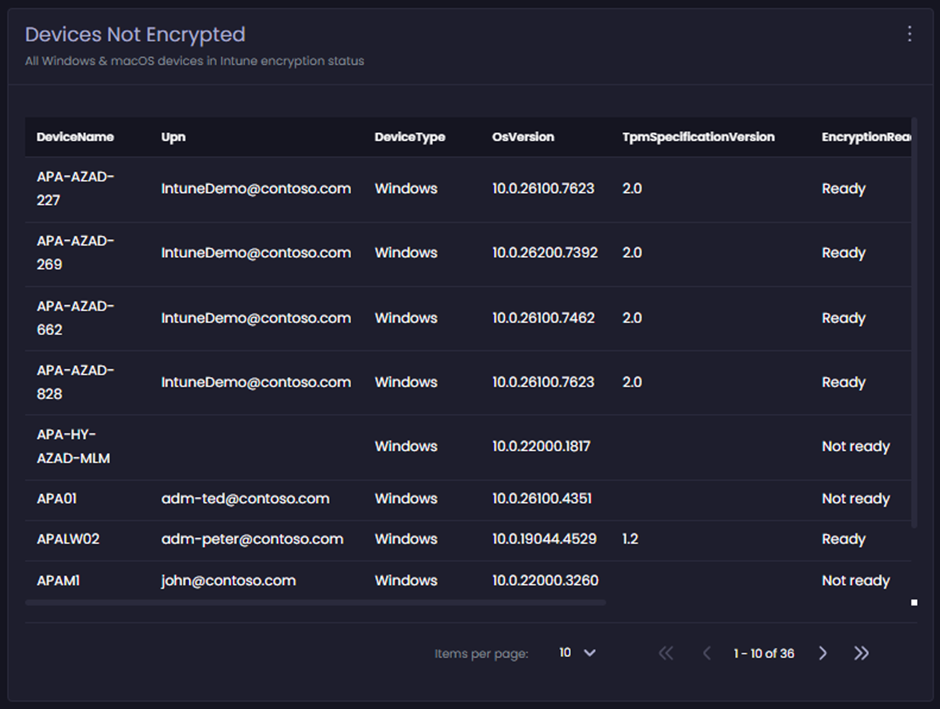
### Devices Not Encrypted (Table list)

Provides a table list view for all Windows and macOS managed devices that are not encrypted. This uses the **isEncrypted** property equals **false**. Clicking on any item in the table list launches the specific device modal.

<figure><img src="https://3773699522-files.gitbook.io/~/files/v0/b/gitbook-x-prod.appspot.com/o/spaces%2F-MX7dvS0r_4fc0AikgJS%2Fuploads%2F3PswBe84ei5dPcQ5L86f%2Fimage.png?alt=media&#x26;token=151270ac-d098-44f1-b39f-98c96d9c9e9a" alt="Devices Not Encrypted (Table list)" width="563"><figcaption></figcaption></figure>

## Applications tab

All dashboard items in this view are populated using properties from managed apps (Windows and macOS) and the install state data from the Intune tenant.

<figure><img src="https://3773699522-files.gitbook.io/~/files/v0/b/gitbook-x-prod.appspot.com/o/spaces%2F-MX7dvS0r_4fc0AikgJS%2Fuploads%2Fv1IE92It2kTn6oz6vIce%2Fimage.png?alt=media&#x26;token=8f86d2b5-2a7d-40a5-a998-9248b7f1b230" alt="Applications tab" width="563"><figcaption></figcaption></figure>

<figure><img src="https://3773699522-files.gitbook.io/~/files/v0/b/gitbook-x-prod.appspot.com/o/spaces%2F-MX7dvS0r_4fc0AikgJS%2Fuploads%2FUG96UkWjHmkPml309pE1%2Fimage.png?alt=media&#x26;token=c9edaccb-3beb-484a-a368-9b5ffbd037a3" alt="Applications tab 2" width="563"><figcaption></figcaption></figure>

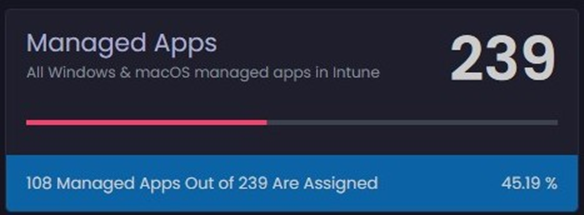
### Managed Apps (Dash-stat)

Provides a count of all Windows and macOS managed apps. The footer item uses the **isAssigned** property to show a count of unassigned apps.

<figure><img src="https://3773699522-files.gitbook.io/~/files/v0/b/gitbook-x-prod.appspot.com/o/spaces%2F-MX7dvS0r_4fc0AikgJS%2Fuploads%2FXHD8suxLkM9olhWCNJEq%2Fimage.png?alt=media&#x26;token=b76318c0-8f84-4265-9e85-0b11a4857dd7" alt="Managed Apps (Dash-stat)" width="438"><figcaption></figcaption></figure>

Clicking this item loads a table list view of the full dataset. Each app listed in the table can also be clicked to launch the specific app modal.

**App modal Example:**

The **General** tab shows managed app properties, assignment, and device install state counts. Items in this view are not currently clickable.

<figure><img src="https://3773699522-files.gitbook.io/~/files/v0/b/gitbook-x-prod.appspot.com/o/spaces%2F-MX7dvS0r_4fc0AikgJS%2Fuploads%2FUF3652HuabMjR6S1zn57%2Fimage.png?alt=media&#x26;token=3fd1a32b-a418-446c-83ce-fcdf828bc386" alt="App modal Example" width="563"><figcaption></figcaption></figure>

The **Install State** tab displays a donut chart of device install state, and two additional tabs show lists of device and user install states. Items in this view are not currently clickable.

<figure><img src="https://3773699522-files.gitbook.io/~/files/v0/b/gitbook-x-prod.appspot.com/o/spaces%2F-MX7dvS0r_4fc0AikgJS%2Fuploads%2FXbRzUzJeFSmSu1ItmB8z%2Fimage.png?alt=media&#x26;token=bb0a5ece-46e4-4e3c-8cb2-e0e4890b57c5" alt="&#x27;Install State&#x27; tab" width="563"><figcaption></figcaption></figure>

### Modified App – Last 24hrs (Dash-stat)

Provides a count of all Windows and macOS managed apps modified in the last 24hrs. This item uses the **lastModifiedDateTime** property for the count.

<figure><img src="https://3773699522-files.gitbook.io/~/files/v0/b/gitbook-x-prod.appspot.com/o/spaces%2F-MX7dvS0r_4fc0AikgJS%2Fuploads%2FBhfD91ozNTcqePprqlH0%2Fimage.png?alt=media&#x26;token=e6ee56a3-8dba-4c49-8e65-7b28f32ce99c" alt="Modified App – Last 24hrs (Dash-stat)" width="436"><figcaption></figcaption></figure>

Clicking this item loads a table list view of the full dataset. Each app listed in the table can also be clicked to launch the specific app modal.

### Unassigned Apps (Dash-stat)

Provides a count of all Windows and macOS managed apps that are unassigned. This item uses the **isAssigned** property for the count.

<figure><img src="https://3773699522-files.gitbook.io/~/files/v0/b/gitbook-x-prod.appspot.com/o/spaces%2F-MX7dvS0r_4fc0AikgJS%2Fuploads%2FWGw7Nb0ZpVwvixIIWcti%2Fimage.png?alt=media&#x26;token=34edbe89-6e61-4f41-a0ed-5fe3be75669e" alt="Unassigned Apps (Dash-stat)" width="443"><figcaption></figcaption></figure>

Clicking this item loads a table list view of the full dataset. Each app listed in the table can also be clicked to launch the specific app modal.

### App Install Failed (Dash-stat)

Provides a count of all Windows and macOS managed apps that reporting a failed install state. This item uses the **FailedDeviceCount** property for the count. The footer item displays additional data from a slightly different perspective, showing how many apps are reporting **success** (**InstalledDeviceCount**) Vs how many apps have an active assignment (**isAssigned** is **true**).

<figure><img src="https://3773699522-files.gitbook.io/~/files/v0/b/gitbook-x-prod.appspot.com/o/spaces%2F-MX7dvS0r_4fc0AikgJS%2Fuploads%2Fj0jf4x0BfibLvCHwXFSE%2Fimage.png?alt=media&#x26;token=414d1c0a-5e3a-43a2-83fd-9b528fb1c4c9" alt="App Install Failed (Dash-stat)" width="441"><figcaption></figcaption></figure>

In this example:

* 108 apps have **active** assignments
* Of those 108 apps, 32 are reporting **success**
* Of those 108 apps, 9 are reporting **failed**.

Clicking this item loads a table list view of the full dataset. Each app listed in the table can also be clicked to launch the specific app modal.

### Managed Apps (Table list)

Provides a table list view for all Windows and macOS managed apps. Clicking any item in the table list launches the specific app modal.

<figure><img src="https://3773699522-files.gitbook.io/~/files/v0/b/gitbook-x-prod.appspot.com/o/spaces%2F-MX7dvS0r_4fc0AikgJS%2Fuploads%2FsknlSDjH1ZUVpLiAC7pz%2Fimage.png?alt=media&#x26;token=766b449f-81cd-4cb3-8575-4ddb9d23c37c" alt="Managed Apps (Table list)" width="563"><figcaption></figcaption></figure>

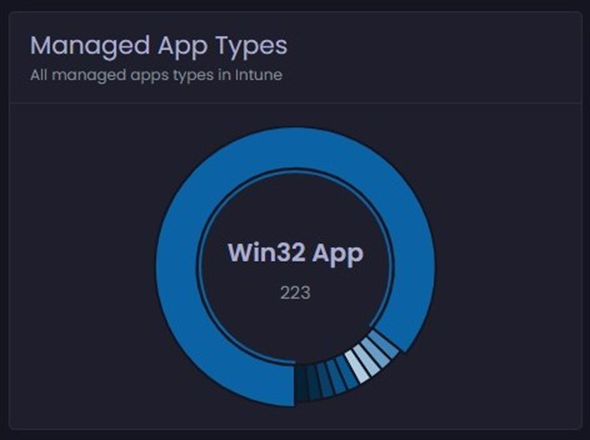
### Managed App Types (Donut chart)

Provides a count of managed app types for Windows and macOS. This item uses the **platform** property for the count.

<figure><img src="https://3773699522-files.gitbook.io/~/files/v0/b/gitbook-x-prod.appspot.com/o/spaces%2F-MX7dvS0r_4fc0AikgJS%2Fuploads%2FfkS2oZ5bp5ZbaVW2NnGY%2Fimage.png?alt=media&#x26;token=12964bac-e135-4989-9e76-43c4f9ffbeb0" alt="Managed App Types (Donut chart)" width="443"><figcaption></figcaption></figure>

Clicking any item in the donut chart loads a table list view of the full dataset related to the clicked item. Each app listed in the table can also be clicked to launch the specific app modal. For example:

<figure><img src="https://3773699522-files.gitbook.io/~/files/v0/b/gitbook-x-prod.appspot.com/o/spaces%2F-MX7dvS0r_4fc0AikgJS%2Fuploads%2FjiagTyFeSovztK1zYK5H%2Fimage.png?alt=media&#x26;token=62ccc9c3-0620-4c32-a1d7-60e6fe318ca6" alt="Table list view of the full dataset related to the clicked item" width="563"><figcaption></figcaption></figure>

### Managed App Install States (Donut chart)

Provides a count of Windows and macOS managed app install states, using the following properties for the count:

* **FailedDeviceCount**
* **FailedUserCount**
* **InstalledDeviceCount**
* **InstalledUserCount**
* **PendingInstallDeviceCount**
* **PendingInstallUserCount**
* **NotApplicableDeviceCount**
* **NotApplicableUserCount**
* **NotInstalledDeviceCount**
* **NotInstalledUserCount**

In this example, the active selection of the donut chart shows that there are a total of 44 devices reporting **failed install status** across all apps.

<figure><img src="https://3773699522-files.gitbook.io/~/files/v0/b/gitbook-x-prod.appspot.com/o/spaces%2F-MX7dvS0r_4fc0AikgJS%2Fuploads%2F1eyj3nlaYkciC0QvuEAn%2Fimage.png?alt=media&#x26;token=45363f6a-0c3b-4309-b3ba-c23ff47286c8" alt="Managed App Install States (Donut chart)" width="447"><figcaption></figcaption></figure>

Clicking any item in the donut chart loads a table list view of the full dataset related to the clicked item. The table view shows the **failed device count** grouped by app.

Each app listed in the table can also be clicked to launch the specific app modal. For example:

<figure><img src="https://3773699522-files.gitbook.io/~/files/v0/b/gitbook-x-prod.appspot.com/o/spaces%2F-MX7dvS0r_4fc0AikgJS%2Fuploads%2Fl59i9PihCxhlAyVVWHqA%2Fimage.png?alt=media&#x26;token=9400c0d9-f570-4640-9736-17441d3b2f70" alt="Table view showing the failed device count grouped by app" width="563"><figcaption></figcaption></figure>

### Discovered Apps (Dash-stat)

Provides a count of all discovered apps, collected by Intune Inventory.

<figure><img src="https://3773699522-files.gitbook.io/~/files/v0/b/gitbook-x-prod.appspot.com/o/spaces%2F-MX7dvS0r_4fc0AikgJS%2Fuploads%2FV9fK9trJSvx5yVr8Q9T9%2Fimage.png?alt=media&#x26;token=bdb62fa6-0b0a-4065-a26d-c25d494890c5" alt="Discovered Apps (Dash-stat)" width="438"><figcaption></figcaption></figure>

Clicking this item loads a table list view of the full dataset. Each discovered app listed in the table can also be clicked to launch the specific discovered app modal.

### Managed Devices - Discovered Apps (Table list)

Provides a table list view of all discovered apps, which are collected by Intune Inventory.

<figure><img src="https://3773699522-files.gitbook.io/~/files/v0/b/gitbook-x-prod.appspot.com/o/spaces%2F-MX7dvS0r_4fc0AikgJS%2Fuploads%2F7JrXEmisMz1VLopObSWE%2Fimage.png?alt=media&#x26;token=8dc46d31-a942-4099-b376-22226e44dc93" alt="Managed Devices - Discovered Apps (Table list)" width="563"><figcaption></figcaption></figure>

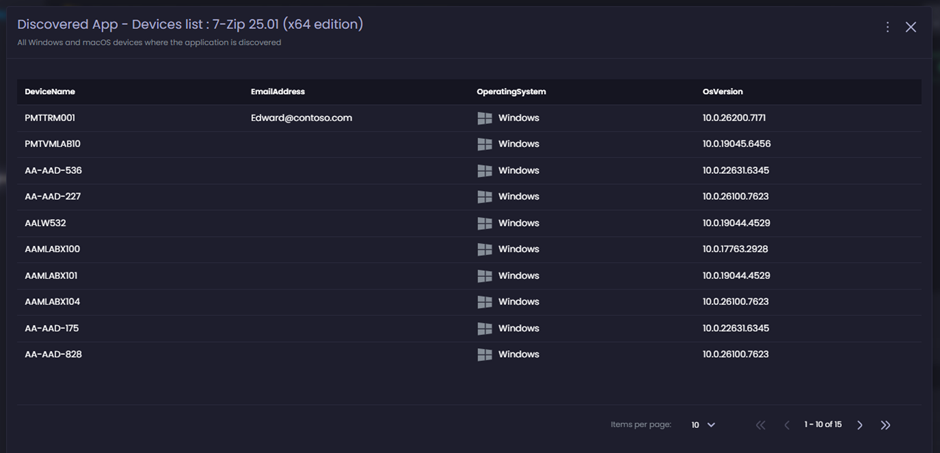
Clicking any item in the table list launches the specific discovered app list view which shows all devices where the specific app has been discovered. For example:

<figure><img src="https://3773699522-files.gitbook.io/~/files/v0/b/gitbook-x-prod.appspot.com/o/spaces%2F-MX7dvS0r_4fc0AikgJS%2Fuploads%2FSwAdM4fUP1pJ5K2oqefV%2Fimage.png?alt=media&#x26;token=1af16de4-fd3a-4b5e-8b4b-88d9366f01e5" alt="Discovered app details example" width="563"><figcaption></figcaption></figure>

## Compliance tab

All dashboard items in this view are populated using properties from a collection of Intune objects, including managed device compliance state and compliance policy information.

<figure><img src="https://3773699522-files.gitbook.io/~/files/v0/b/gitbook-x-prod.appspot.com/o/spaces%2F-MX7dvS0r_4fc0AikgJS%2Fuploads%2Fy78z7lVbLfgxNxImLLfo%2Fimage.png?alt=media&#x26;token=6bd26508-b03f-41b0-b215-23e31fd4fd6b" alt="Compliance tab" width="563"><figcaption></figcaption></figure>

### Managed Devices (Dash-stat)

Provides a total count of all Windows and macOS devices. The footer item uses the **complianceState** property to show a count of non-compliant devices.

<figure><img src="https://3773699522-files.gitbook.io/~/files/v0/b/gitbook-x-prod.appspot.com/o/spaces%2F-MX7dvS0r_4fc0AikgJS%2Fuploads%2FKEfJ7vvioUDU0Aqo3Qqq%2Fimage.png?alt=media&#x26;token=e18847d4-5ed2-41b5-8d63-15a59aed51d6" alt="Managed Devices (Dash-stat)" width="442"><figcaption></figcaption></figure>

Clicking this item loads a table list view of the full dataset. Each device listed in the table can also be clicked to launch the specific device modal.

### Non-compliant devices (Dash-stat)

Provides a total count of all Windows and macOS devices that are reporting a device compliance state not equal to **Compliant**. This item uses the **complianceState** property for the count.

<figure><img src="https://3773699522-files.gitbook.io/~/files/v0/b/gitbook-x-prod.appspot.com/o/spaces%2F-MX7dvS0r_4fc0AikgJS%2Fuploads%2FvaSyUdVlfyacs3rU4GK2%2Fimage.png?alt=media&#x26;token=21b6df72-5a7a-4119-8d84-e3215567b87e" alt="Non-compliant devices (Dash-stat)" width="443"><figcaption></figcaption></figure>

Clicking this item loads a table list view of the full dataset. Each device listed in the table can also be clicked to launch the specific device modal.

### Non-compliant policies (Dash-stat)

Provides a total count of compliance policies targeting Windows and macOS devices that have one or more devices reporting non-compliant against the specific policy.

<figure><img src="https://3773699522-files.gitbook.io/~/files/v0/b/gitbook-x-prod.appspot.com/o/spaces%2F-MX7dvS0r_4fc0AikgJS%2Fuploads%2F0HtEqJi7NehX6ndu5lpW%2Fimage.png?alt=media&#x26;token=d16208cb-96f0-4b66-806c-302ece1062a1" alt="Non-compliant policies (Dash-stat)" width="442"><figcaption></figcaption></figure>

Clicking this item loads a table list view of the full dataset. Items in the table list cannot be clicked.

<figure><img src="https://3773699522-files.gitbook.io/~/files/v0/b/gitbook-x-prod.appspot.com/o/spaces%2F-MX7dvS0r_4fc0AikgJS%2Fuploads%2FP8HdOo0bpYR5FjJIeRxp%2Fimage.png?alt=media&#x26;token=4e2a7dc6-deec-406b-ba3c-23f3136a8a24" alt="Table list view of the full dataset" width="563"><figcaption></figcaption></figure>

### Intune compliance policies (Dash-stat)

Provides a total count of compliance policies targeting Windows and macOS devices.

<figure><img src="https://3773699522-files.gitbook.io/~/files/v0/b/gitbook-x-prod.appspot.com/o/spaces%2F-MX7dvS0r_4fc0AikgJS%2Fuploads%2FM47ZjE5ZZ4U6EPImG66k%2Fimage.png?alt=media&#x26;token=6ce546da-451a-41ad-8a10-1b9766214c8f" alt="Intune compliance policies (Dash-stat)" width="443"><figcaption></figcaption></figure>

Clicking this item loads a table list view of the full dataset. Items in table list cannot be clicked.

### Device Compliance State (Donut chart)

Provides a count of Windows and macOS managed devices and their compliance state. This item uses the **complianceState** property for the count.

<figure><img src="https://3773699522-files.gitbook.io/~/files/v0/b/gitbook-x-prod.appspot.com/o/spaces%2F-MX7dvS0r_4fc0AikgJS%2Fuploads%2Fni9D6T4ksqC3uJh7A6zC%2Fimage.png?alt=media&#x26;token=52c17ca3-26d8-4120-ae73-faf47cfd3ccd" alt="Device Compliance State (Donut chart)" width="363"><figcaption></figcaption></figure>

Clicking any item in the donut chart opens a table view of the full dataset for that item. Each device listed in the table can also be clicked to launch the specific device modal.

### Device Compliance By Type (Donut chart)

Provides a count of Windows and macOS managed devices and their compliance state grouped by device type. This item uses the **operatingSystem** and **complianceState** property for the counts.

<figure><img src="https://3773699522-files.gitbook.io/~/files/v0/b/gitbook-x-prod.appspot.com/o/spaces%2F-MX7dvS0r_4fc0AikgJS%2Fuploads%2FroYdWplXmgDBdBWzsMhC%2Fimage.png?alt=media&#x26;token=0bc315f5-5e4c-4ffe-881c-4311d1b4bf2e" alt="Device Compliance By Type (Donut chart)" width="362"><figcaption></figcaption></figure>

Clicking any item in the donut chart opens a table view of the full dataset for that item. Each device listed in the table can also be clicked to launch the specific device modal.

### Policy Non-Compliant By Platforms (Donut chart)

Provides a total count of compliance policies targeting Windows and macOS devices that have one or more devices reporting non-compliant against the specific policy. The donut chart data is grouped by compliance policy platform targeted type property (**UnifiedPolicyPlatformType**).

<figure><img src="https://3773699522-files.gitbook.io/~/files/v0/b/gitbook-x-prod.appspot.com/o/spaces%2F-MX7dvS0r_4fc0AikgJS%2Fuploads%2FgUtGWQ84Cvo31qr1driO%2Fimage.png?alt=media&#x26;token=8fd36a28-99dd-43d3-8b1d-77bce155b7d3" alt="Policy Non-Compliant By Platforms (Donut chart)" width="443"><figcaption></figcaption></figure>

Clicking any item in the donut chart opens a table view of the full dataset for that item. Items in the table list cannot be clicked.

### Compliance Policies By Platforms (Donut chart)

Provides a total count of compliance policies targeting Windows and macOS devices. The donut chart data is grouped by compliance policy platform, targeted type, and property (**windows10CompliancePolicy** or **macOSCompliancePolicy**).

<figure><img src="https://3773699522-files.gitbook.io/~/files/v0/b/gitbook-x-prod.appspot.com/o/spaces%2F-MX7dvS0r_4fc0AikgJS%2Fuploads%2FlSatsRgp1h6FtRDjGZtP%2Fimage.png?alt=media&#x26;token=86ef3339-3dc6-4b76-afdb-9c8715d918b2" alt="Compliance Policies By Platforms (Donut chart)" width="442"><figcaption></figcaption></figure>

Clicking any item in the donut chart opens a table view of the full dataset for that item. Items in the table list cannot be clicked.

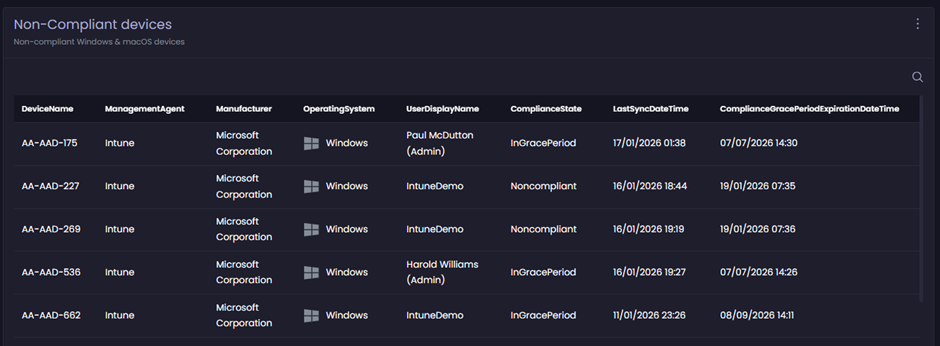
### Non-Compliant devices (Table list)

Provides a table list view including properties of Windows and macOS managed devices that have their **complianceState** property not equal to **Compliant**. Clicking any item in the table list launches the specific device modal.

<figure><img src="https://3773699522-files.gitbook.io/~/files/v0/b/gitbook-x-prod.appspot.com/o/spaces%2F-MX7dvS0r_4fc0AikgJS%2Fuploads%2FrR5j7wKZCP0EnsM03f62%2Fimage.png?alt=media&#x26;token=141195dd-144b-4108-8ce1-7105d3ce98d4" alt="Non-Compliant devices (Table list)" width="563"><figcaption></figcaption></figure>

## Configuration tab

All dashboard items in this view are populated from properties of a collection of Intune objects, including managed device properties, Autopilot state events, and Windows Defender properties.

<figure><img src="https://3773699522-files.gitbook.io/~/files/v0/b/gitbook-x-prod.appspot.com/o/spaces%2F-MX7dvS0r_4fc0AikgJS%2Fuploads%2Feu3M1tnXc1WTu5Dp6QC0%2Fimage.png?alt=media&#x26;token=9b4903a1-229e-4e73-a84a-5d9c73c41540" alt="Configuration tab" width="563"><figcaption></figcaption></figure>

### Managed Devices (Dash-stat)

Provides a total count of all Windows and macOS devices. The footer item uses the **complianceState** property to show a count of non-compliant devices.

<figure><img src="https://3773699522-files.gitbook.io/~/files/v0/b/gitbook-x-prod.appspot.com/o/spaces%2F-MX7dvS0r_4fc0AikgJS%2Fuploads%2FMVd3JkeXVLMaN9ltrvYp%2Fimage.png?alt=media&#x26;token=c9cd6caf-3a08-4f2a-84a8-427beef73a8a" alt="Managed Devices (Dash-stat)" width="442"><figcaption></figcaption></figure>

Clicking this item loads a table list view of the full dataset. Each device listed in the table can also be clicked to launch the specific device modal.

### Device Configuration Profile Issues (Dash-stat)

Provides a total count of all device configuration profiles (targeting Windows and macOS devices) that have either **conflict** or **error** assignment status.

<figure><img src="https://3773699522-files.gitbook.io/~/files/v0/b/gitbook-x-prod.appspot.com/o/spaces%2F-MX7dvS0r_4fc0AikgJS%2Fuploads%2FKXEmStoOoS3CzVdYK8tn%2Fimage.png?alt=media&#x26;token=5dc63071-bfaf-4e3f-ad0f-cf7369c8366d" alt="Device Configuration Profile Issues (Dash-stat)" width="411"><figcaption></figcaption></figure>

Clicking this item loads a table list view of the full dataset. The table lists the policy name and the number of devices reporting ‘conflict’ or ‘error’ assignment status. Items in the table list cannot be clicked.

<figure><img src="https://3773699522-files.gitbook.io/~/files/v0/b/gitbook-x-prod.appspot.com/o/spaces%2F-MX7dvS0r_4fc0AikgJS%2Fuploads%2Fsbq1gxOqDXl35mERfSiR%2Fimage.png?alt=media&#x26;token=76407f26-d3fd-4f2e-8db0-446acb95bc80" alt="Table list view of the full dataset" width="563"><figcaption></figcaption></figure>

### Autopilot Events (Dash-stat)

Provides a total count of all Autopilot events. The footer item uses the **DeploymentState** property with the value **Failure** to show the count of events reporting **failure**.

<figure><img src="https://3773699522-files.gitbook.io/~/files/v0/b/gitbook-x-prod.appspot.com/o/spaces%2F-MX7dvS0r_4fc0AikgJS%2Fuploads%2FJCZs59hePKZy10En4EIZ%2Fimage.png?alt=media&#x26;token=395c08a5-93c7-4c61-b539-c5b07c0ee881" alt="Autopilot Events (Dash-stat)" width="359"><figcaption></figcaption></figure>

Clicking this item loads a table list view of the full dataset. Items in the table list cannot be clicked on in the current release.

<figure><img src="https://3773699522-files.gitbook.io/~/files/v0/b/gitbook-x-prod.appspot.com/o/spaces%2F-MX7dvS0r_4fc0AikgJS%2Fuploads%2FdZG7Q9XsWm97Ddddjj1Y%2Fimage.png?alt=media&#x26;token=b325bde7-0877-441d-b75b-75f949bfcb68" alt="Example table list" width="563"><figcaption></figcaption></figure>

### Autopilot Devices (Dash-stat)

Provides the total count of Autopilot-registered devices.

<figure><img src="https://3773699522-files.gitbook.io/~/files/v0/b/gitbook-x-prod.appspot.com/o/spaces%2F-MX7dvS0r_4fc0AikgJS%2Fuploads%2FTiQkiow4LUtXdOO1dU5j%2Fimage.png?alt=media&#x26;token=9135b767-309e-48b1-a3d2-0303e8316c42" alt="Autopilot Devices (Dash-stat)" width="359"><figcaption></figcaption></figure>

Clicking this item loads a table list view of the full dataset. Items in the table list cannot be clicked on in the current release.

<figure><img src="https://3773699522-files.gitbook.io/~/files/v0/b/gitbook-x-prod.appspot.com/o/spaces%2F-MX7dvS0r_4fc0AikgJS%2Fuploads%2FReJP9owYWWG1JoYelr4z%2Fimage.png?alt=media&#x26;token=cc83249d-96d9-491f-923f-4a2416fb6a32" alt="Example table" width="563"><figcaption></figcaption></figure>

Clicking any item in the donut chart opens a table view of the full dataset for that item. Clicking any item in the table opens the corresponding device modal.

### Device Encryption Summary (Donut chart)

Provides a total count of managed device encryption status. The donut chart data is grouped by **EncryptionStatus** property.

<figure><img src="https://3773699522-files.gitbook.io/~/files/v0/b/gitbook-x-prod.appspot.com/o/spaces%2F-MX7dvS0r_4fc0AikgJS%2Fuploads%2FkCghi6SuimXEGr3lF3NZ%2Fimage.png?alt=media&#x26;token=d5c8b83e-fa58-4aa5-aa7b-38c4ec6bcd67" alt="Device Encryption Summary (Donut chart)" width="443"><figcaption></figcaption></figure>

Clicking any item in the donut chart opens a table view of the full dataset for that item. Clicking any item in the table list launches the specific device modal.

### Configuration Profile Issues (Donut chart)

Provides a total count of all device configuration profile types (targeting Windows and macOS devices) that have either **conflict** or **error** assignment events; grouped by policy type.

<figure><img src="https://3773699522-files.gitbook.io/~/files/v0/b/gitbook-x-prod.appspot.com/o/spaces%2F-MX7dvS0r_4fc0AikgJS%2Fuploads%2F57SItUrZhMjjKbqrynlQ%2Fimage.png?alt=media&#x26;token=1b509bc7-3a41-4664-85d3-8fd500310ec5" alt="Configuration Profile Issues (Donut chart)" width="355"><figcaption></figcaption></figure>

Clicking any item in the donut chart opens a table view of the full dataset for that item. The table lists the policy name and the number of devices reporting ‘conflict’ or ‘error’ assignment status. Items in the table cannot be clicked.

<figure><img src="https://3773699522-files.gitbook.io/~/files/v0/b/gitbook-x-prod.appspot.com/o/spaces%2F-MX7dvS0r_4fc0AikgJS%2Fuploads%2FkacLyVA3qpff5FL6Y3go%2Fimage.png?alt=media&#x26;token=f6c24cef-a52c-43c9-8528-2c40132a325e" alt="Example table" width="563"><figcaption></figcaption></figure>

### Autopilot Deployment States (Donut chart)

Provides a total count of Autopilot events. The donut chart data is grouped by **DeploymentState** property.

<figure><img src="https://3773699522-files.gitbook.io/~/files/v0/b/gitbook-x-prod.appspot.com/o/spaces%2F-MX7dvS0r_4fc0AikgJS%2Fuploads%2FhiKEEP2qdf65IFdQVASm%2Fimage.png?alt=media&#x26;token=a9c15f02-577d-43d6-870e-53beb8e860dc" alt="Autopilot Deployment States (Donut chart)" width="438"><figcaption></figcaption></figure>

Clicking any item in the donut chart opens a table view of the full dataset for that item. Items in the table list cannot be clicked.

<figure><img src="https://3773699522-files.gitbook.io/~/files/v0/b/gitbook-x-prod.appspot.com/o/spaces%2F-MX7dvS0r_4fc0AikgJS%2Fuploads%2FfEcJ275S1Khq7P7ckk6A%2Fimage.png?alt=media&#x26;token=e34d7fb6-8ece-4503-b3ac-c7afe5415f44" alt="Example table" width="563"><figcaption></figcaption></figure>

### Autopilot Device Enrollment States (Donut chart)

Provides a total count of Autopilot events. The donut chart data is grouped by **EnrollmentState** property.

<figure><img src="https://3773699522-files.gitbook.io/~/files/v0/b/gitbook-x-prod.appspot.com/o/spaces%2F-MX7dvS0r_4fc0AikgJS%2Fuploads%2F5GyegQTGNCH7Mj0odQnG%2Fimage.png?alt=media&#x26;token=53d5fcce-46de-41d2-8ecf-c8d0835a9344" alt="Autopilot Device Enrollment States (Donut chart)" width="356"><figcaption></figcaption></figure>

Clicking any item in the donut chart loads a table list view of the full dataset related to the clicked item. Items in the table list cannot be clicked.

<figure><img src="https://3773699522-files.gitbook.io/~/files/v0/b/gitbook-x-prod.appspot.com/o/spaces%2F-MX7dvS0r_4fc0AikgJS%2Fuploads%2FPW91M45EQnkamCgxI4tm%2Fimage.png?alt=media&#x26;token=7c57c095-54fd-4e39-9a89-da1ba6df6da9" alt="Example table" width="563"><figcaption></figcaption></figure>

### Device Enrollment Types (Table list)

Provides a table view listing the **DeviceEnrollmentType** property for Windows and macOS managed devices. Clicking any item in the table opens the corresponding device modal.

<figure><img src="https://3773699522-files.gitbook.io/~/files/v0/b/gitbook-x-prod.appspot.com/o/spaces%2F-MX7dvS0r_4fc0AikgJS%2Fuploads%2FJr03ixYMA6Z6RkH2ADoY%2Fimage.png?alt=media&#x26;token=b2316485-0e85-4b1a-acf3-400aacf750a6" alt="Device Enrollment Types (Table list)" width="563"><figcaption></figcaption></figure>

### Unhealthy Defender Agents (Donut chart)

Provides a total count of specific properties reported in the **Unhealthy endpoints** dataset from Intune (**Endpoint security > Antivirus**).

The donut chart data is grouped by the following properties:

* **MalwareProtectionEnabled**
* **NetworkInspectionSystemEnabled**
* **RealTimeProtectionEnabled**
* **SignatureUpdateOverdue**

<figure><img src="https://3773699522-files.gitbook.io/~/files/v0/b/gitbook-x-prod.appspot.com/o/spaces%2F-MX7dvS0r_4fc0AikgJS%2Fuploads%2FT5EOKgDs0S6ieJZewvFb%2Fimage.png?alt=media&#x26;token=81dbc04f-dae5-4101-94bd-82f4c339c552" alt="Unhealthy Defender Agents (Donut chart)" width="416"><figcaption></figcaption></figure>

Clicking any item in the donut chart opens a table view of the full dataset for that item. Clicking any item in the table opens the corresponding device modal.

<figure><img src="https://3773699522-files.gitbook.io/~/files/v0/b/gitbook-x-prod.appspot.com/o/spaces%2F-MX7dvS0r_4fc0AikgJS%2Fuploads%2FdWDDrK2HSccMjfjneel7%2Fimage.png?alt=media&#x26;token=0ec98e92-12fe-45fc-af23-6f36d6c4d105" alt="Example table" width="563"><figcaption></figcaption></figure>

### Autopilot Enrollment Profile States (Donut chart)

Provides a total count of Autopilot devices by enrolment profile assignment state. The donut chart data is grouped by **DeploymentProfileAssignmentStatus** property.

<figure><img src="https://3773699522-files.gitbook.io/~/files/v0/b/gitbook-x-prod.appspot.com/o/spaces%2F-MX7dvS0r_4fc0AikgJS%2Fuploads%2F7PkntTRjT5ISf9V0WDXK%2Fimage.png?alt=media&#x26;token=2f0fc432-82f9-4ada-bbf4-3b93779edbbb" alt="Autopilot Enrollment Profile States (Donut chart)" width="363"><figcaption></figcaption></figure>

Clicking any item in the donut chart opens a table view of the full dataset for that item. Items in the table list cannot be clicked.

<figure><img src="https://3773699522-files.gitbook.io/~/files/v0/b/gitbook-x-prod.appspot.com/o/spaces%2F-MX7dvS0r_4fc0AikgJS%2Fuploads%2Fbiz3fj7TDFgArpW8e2nE%2Fimage.png?alt=media&#x26;token=fdb5bbca-7da3-4a03-b90e-cbd153b8f21f" alt="Example table" width="563"><figcaption></figcaption></figure>

## Operating Systems tab

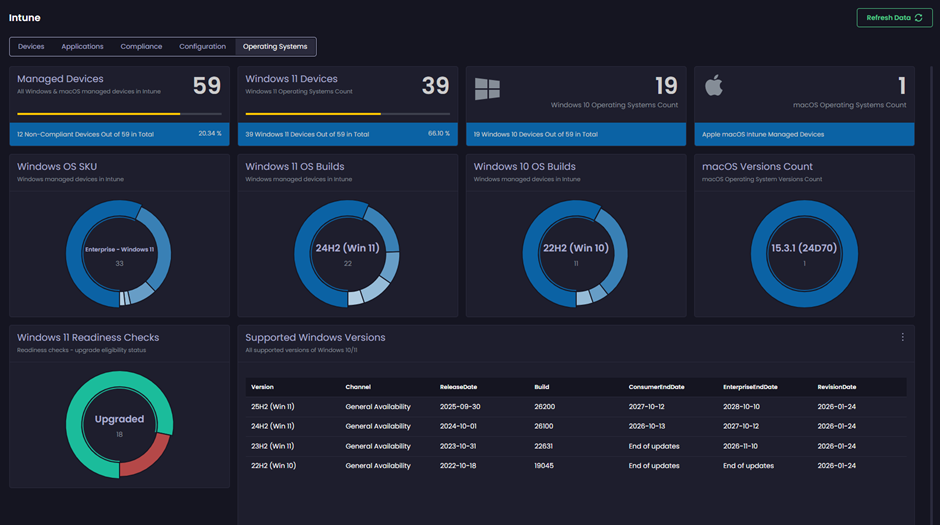
All dashboard items in this view are populated using values from managed device properties.

<figure><img src="https://3773699522-files.gitbook.io/~/files/v0/b/gitbook-x-prod.appspot.com/o/spaces%2F-MX7dvS0r_4fc0AikgJS%2Fuploads%2FAXcLfLTzIxtrl8lmHPTC%2Fimage.png?alt=media&#x26;token=c0923463-64ce-427c-9cf1-2650a1118666" alt="Operating Systems tab" width="563"><figcaption></figcaption></figure>

### Managed Devices (Dash-stat)

Provides a total count of all Windows and macOS devices. The footer item uses the **complianceState** property to show a count of non-compliant devices.

<figure><img src="https://3773699522-files.gitbook.io/~/files/v0/b/gitbook-x-prod.appspot.com/o/spaces%2F-MX7dvS0r_4fc0AikgJS%2Fuploads%2FSzqxriDc2Wu4urCeGllH%2Fimage.png?alt=media&#x26;token=a1393def-1ad2-4d13-8f61-86d7e9e86f54" alt="Managed Devices (Dash-stat)" width="442"><figcaption></figcaption></figure>

Clicking this item loads a table list view of the full dataset. Each device listed in the table can also be clicked to launch the specific device modal.

### Windows 11 Devices (Dash-stat)

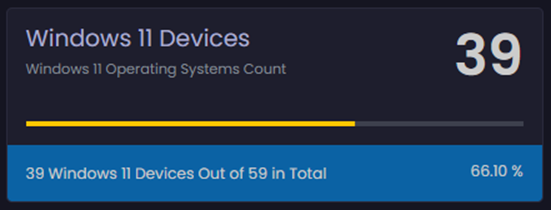
Provides a total count of all Windows 11 devices. The footer item uses the OSVersion value and total count of all devices.

<figure><img src="https://3773699522-files.gitbook.io/~/files/v0/b/gitbook-x-prod.appspot.com/o/spaces%2F-MX7dvS0r_4fc0AikgJS%2Fuploads%2FxKm8z4GUTIRougfJR5vA%2Fimage.png?alt=media&#x26;token=dd8b064c-9b70-412e-b188-b21922be9f83" alt="Windows 11 Devices (Dash-stat)" width="413"><figcaption></figcaption></figure>

Clicking this item loads a table list view of the full dataset. Each device listed in the table can also be clicked to launch the specific device modal.

### Windows 10 Devices (Dash-stat)

Provides a total count of all Windows 10 devices. The footer item uses the OSVersion value and total count of all devices.

<figure><img src="https://3773699522-files.gitbook.io/~/files/v0/b/gitbook-x-prod.appspot.com/o/spaces%2F-MX7dvS0r_4fc0AikgJS%2Fuploads%2F5Xko8Aq0iyfHDZnfcXIM%2Fimage.png?alt=media&#x26;token=bd5a4bf9-dbd1-49b3-9ecc-dc5a4dbdb6ff" alt="Windows 10 Devices (Dash-stat)" width="405"><figcaption></figcaption></figure>

Clicking this item loads a table list view of the full dataset. Each device listed in the table can also be clicked to launch the specific device modal.

### macOS Devices (Dash-stat)

Provides a total count of all macOS devices.

<figure><img src="https://3773699522-files.gitbook.io/~/files/v0/b/gitbook-x-prod.appspot.com/o/spaces%2F-MX7dvS0r_4fc0AikgJS%2Fuploads%2FnyuBHHkpGm9yMciZ1TZb%2Fimage.png?alt=media&#x26;token=0b7274c2-ade4-49f2-8675-ea7785196fd7" alt="macOS Devices (Dash-stat)" width="416"><figcaption></figcaption></figure>

Clicking this item loads a table list view of the full dataset. Each device listed in the table can also be clicked to launch the specific device modal.

### Windows OS SKU (Donut chart)

Provides a count of Windows-managed device OS editions, using the **skuFamily** and **OSVersion** properties for grouping and counting.

<figure><img src="https://3773699522-files.gitbook.io/~/files/v0/b/gitbook-x-prod.appspot.com/o/spaces%2F-MX7dvS0r_4fc0AikgJS%2Fuploads%2FVgpZjkfpc6gWoGQQMytY%2Fimage.png?alt=media&#x26;token=255f5acc-7a63-40c2-ac43-21fdf701db4d" alt="Windows OS SKU (Donut chart)" width="415"><figcaption></figcaption></figure>

Clicking any item in the donut chart opens a table view of the full dataset for that item. Each device listed in the table can also be clicked to launch the specific device modal.

### Windows 11 OS Builds (Donut chart)

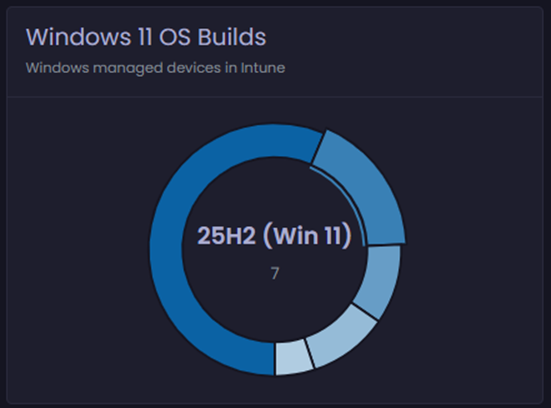
Provides a count of Windows-managed device OS versions, using the **osVersion** property for grouping and counts. Using the **OSVersion** property, we are able to translate that to the OS display name and build-friendly name.

<figure><img src="https://3773699522-files.gitbook.io/~/files/v0/b/gitbook-x-prod.appspot.com/o/spaces%2F-MX7dvS0r_4fc0AikgJS%2Fuploads%2FpBwbnMuqCD3IROHLOSGj%2Fimage.png?alt=media&#x26;token=7fcecbdc-1d2a-4745-854f-d50b0559dc57" alt="Windows 11 OS Builds (Donut chart)" width="413"><figcaption></figcaption></figure>

Clicking any item in the donut chart opens a table view of the full dataset for that item. Each device listed in the table can also be clicked to launch the specific device modal.

### Windows 10 OS Builds (Donut chart)

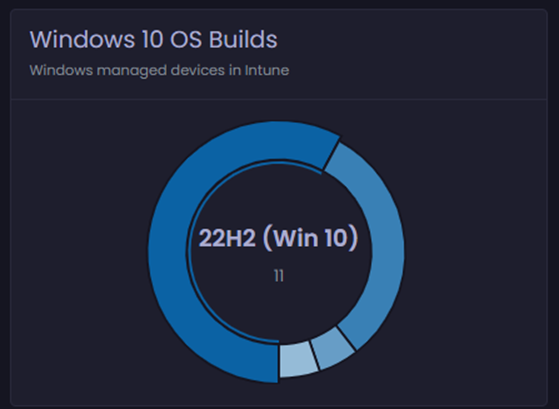
Provides a count of Windows-managed device OS versions, grouping by the **osVersion** property. By using this property, we are able to translate that to the OS display name and build-friendly name.

<figure><img src="https://3773699522-files.gitbook.io/~/files/v0/b/gitbook-x-prod.appspot.com/o/spaces%2F-MX7dvS0r_4fc0AikgJS%2Fuploads%2FkDmAFoeugclQ0nSdub4m%2Fimage.png?alt=media&#x26;token=5754017d-cd73-4684-b5bb-20e255b6e51d" alt="Windows 10 OS Builds (Donut chart)" width="419"><figcaption></figcaption></figure>

Clicking any item in the donut chart opens a table view of the full dataset for that item. Each device listed in the table can also be clicked to launch the specific device modal.

### macOS Versions Count (Donut chart)

Provides a count of macOS-managed device OS versions, using the **osVersion** property for grouping and counting.

<figure><img src="https://3773699522-files.gitbook.io/~/files/v0/b/gitbook-x-prod.appspot.com/o/spaces%2F-MX7dvS0r_4fc0AikgJS%2Fuploads%2FTrrBcGkXTfxAmUR9AT6T%2Fimage.png?alt=media&#x26;token=ecd0f6e3-f3d7-48f2-845a-4212d5eb34ca" alt="macOS Versions Count (Donut chart)" width="413"><figcaption></figcaption></figure>

Clicking any item in the donut chart opens a table view of the full dataset for that item. Each device listed in the table can also be clicked to launch the specific device modal.

### Windows 11 Readiness Checks (Donut chart)

Provides a count of Windows devices and their Windows 11 readiness state, using the **UpgradeEligibility** property for the counts. The donut chart data is grouped by the following **UpgradeEligibility** values:

* **NotCapable**
* **Upgraded**’
* **Capable**
* **Unknown**

<figure><img src="https://3773699522-files.gitbook.io/~/files/v0/b/gitbook-x-prod.appspot.com/o/spaces%2F-MX7dvS0r_4fc0AikgJS%2Fuploads%2FTeZvbkY6LQjEGGkDLf9z%2Fimage.png?alt=media&#x26;token=3ea5516d-ac3a-45bb-8cd6-914c718cdd60" alt="Windows 11 Readiness Checks (Donut chart)" width="443"><figcaption></figcaption></figure>

Clicking any item in the donut chart opens a table view of the full dataset for that item. Each device listed in the table can also be clicked to launch the specific device modal.

<figure><img src="https://3773699522-files.gitbook.io/~/files/v0/b/gitbook-x-prod.appspot.com/o/spaces%2F-MX7dvS0r_4fc0AikgJS%2Fuploads%2F1MFYR9yTdXNZGtw2AXnJ%2Fimage.png?alt=media&#x26;token=26e1778c-e8c5-47b0-b099-d383a78d9eb0" alt="Example table" width="563"><figcaption></figcaption></figure>

### Supported Windows Versions

This data table is populated with Windows OS support lifecycle information, including release and end of support dates for Windows 10 and 11 operating systems. The data is obtained directly from Microsoft.

<figure><img src="https://3773699522-files.gitbook.io/~/files/v0/b/gitbook-x-prod.appspot.com/o/spaces%2F-MX7dvS0r_4fc0AikgJS%2Fuploads%2FkJw4OmuOZr5HJ8gWWK8t%2Fimage.png?alt=media&#x26;token=4c9cecbe-bc3c-457b-9670-60d45cddc0b5" alt="Supported Windows Versions" width="563"><figcaption></figcaption></figure>