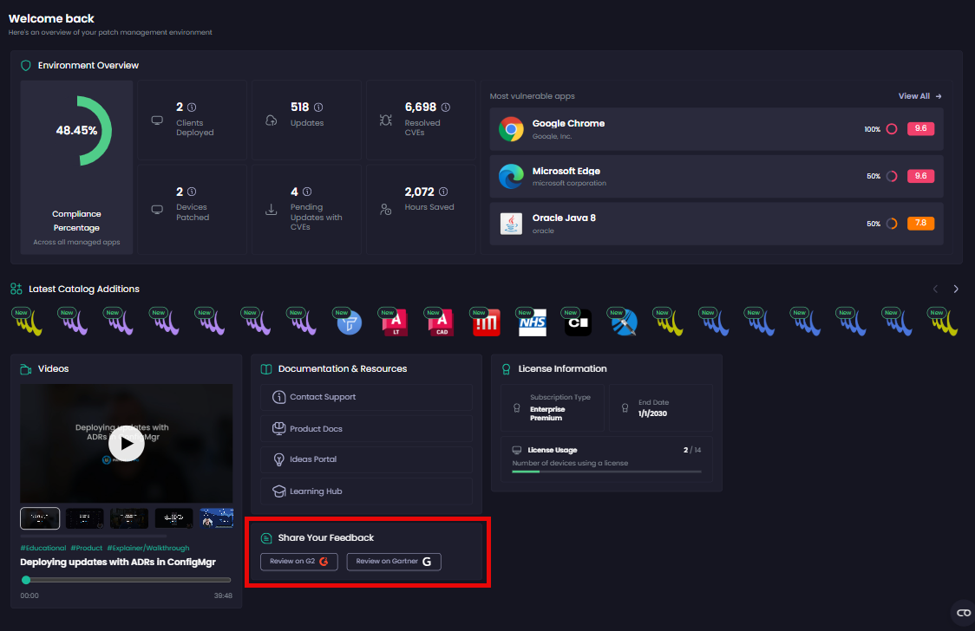
Home page of the Patch My PC Cloud Portal
Applies to: Patch My PC (PMPC) Cloud
PRIVATE PREVIEW
This feature is currently only available through an invitation-only Private Preview, as both it and the documentation are under development, incomplete, and subject to change.
Please do not share links to these docs with others outside of the Private Preview.
Once this feature is released, it will be announced, and this banner will be removed.
All Patch My PC (PMPC) Cloud management-related tasks are performed through the browser-based Cloud Portal. When you sign in to PMPC Cloud using the following link, you see the Home page.
The version of the Home page you see depends on your PMPC Cloud subscription type.
If you are an Enterprise Plus subscriber, you will see this version of the Home page:

Whereas if you are an Enterprise Premium subscriber, you will see this version of the Home page:

The Home page is split into the following tiled areas:
Environment Overview
The Environment Overview section of the Home page provides an overview of the Public Apps in your environment, which refreshes each time you sign in to the Portal.

The Environment Overview section contains the following:
Deployments Up to Date
Percentage of your managed app deployments that are currently publishing the latest available version. PMPC automatically updates your deployments as new versions are released. A high percentage means your deployments are keeping pace with the latest releases across all managed apps.
Compliance Percentage*
Percentage of your managed app updates that have been fully applied across your environment - that is, updates where no devices are left needing them. Unlike Deployments Up to Date (which reflects the version you're publishing), this metric reflects the actual state of your devices: it reaches 100% for an update only once every device has installed it. A high percentage means your devices are fully patched across all managed apps. This chart is shown instead of Deployments Up to Date.
Number of Deployments
Total number of deployments
Clients Deployed*
Total number of PMPC Clients deployed instead of the Number of Deployments.
Updates
Total number of app updates that PMPC published for any apps deployed over the last 12 months
Resolved CVEs
Total number of CVEs resolved in those updates over the last 12 months
Top 3 vulnerabilities resolved
Most significant CVEs that have been remediated by PMPC deployments in your environment over the past 7 days. Each entry shows the CVE identifier and its severity score, so you can see at a glance which high-impact vulnerabilities your recent updates have addressed.
Most Vulnerable Apps*
Apps in your environment with known security vulnerabilities (CVEs), ranked by the highest CVE severity score and then by how many devices have the app installed, so you can prioritize which apps to patch first.
This is shown instead of the Top 3 vulnerabilities resolved.
Devices Patched**
Total number of devices that are patched
Pending Updates with CVEs**
Total number of apps in your environment with CVEs that have outstanding updates on your devices
Hours saved
Total number of work-hours saved based on multiplying every update action by four hours, as that is the average amount of time it takes to do one update manually
** Enterprise Premium only
* Requires the PMPC Client to be installed - These tiles rely on device-level data reported by the PMPC Client. If you have a Premium license but have not installed the Client on your devices, no data will be reported and these tiles will appear empty. Once the Client is installed and devices begin reporting, the tiles will populate automatically.
Latest Catalog Additions
The Latest Catalog Additions section of the Home page shows apps we have added to the PMPC App Catalog.

Any newly added items are marked as New for seven days.
If we detect that an app is unmanaged in your environment, it is flagged with the yellow circle indicator, as shown below.

Clicking an unmanaged app opens its properties screen, allowing you to deploy it.
Videos
The Videos section of the Home page contains links to various videos we have created.
Videos can be played directly on the Home page, and the player supports typical video playback and control options.

Documentation & Resources
The Documentation & Resources section of the Home page contains links to useful resources such as our support portal, product documentation, ideas and feedback portal, and learning hub.

Share Your Feedback
The Share Your Feedback section of the Home page provides links to independent, external review platforms so you can share your feedback about your Patch My PC experience.

License Information
The License Information section of the Home page shows useful licensing information.
If you are an Enterprise Plus customer, the License Information section shows you which Enterprise Premium features you are missing, which you can try out by clicking the Free Trial button.

Last updated
Was this helpful?